
This vulnerable machine is located at https://www.vulnhub.com/entry/election-1,503/.
What I like to do first is create a directory for this box (mkdir eLection1) and open something so I can take notes.
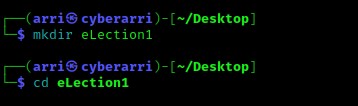
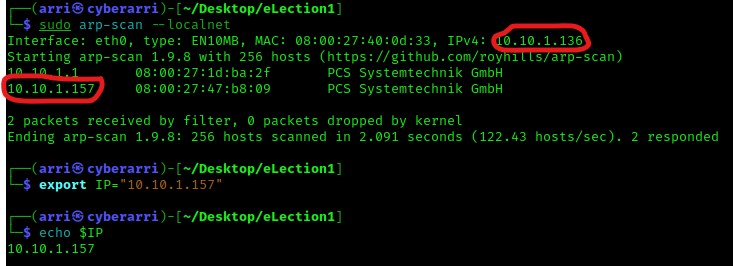
Once I finished this, I checked my IP and the IP of the “eLection” machine using sudo arp-scan --localnet. My IP is the one at the top (10.10.1.136), and the box is the second one on the list (10.10.1.157). Once I figure out the box’s IP, I then set an IP variable using export IP="10.10.1.157". The set IP variable can always be checked by using echo $IP.
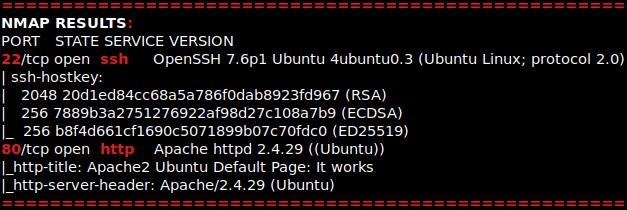
I then nmaped the target using the IP variable I set up to look at what ports are open using sudo nmap -p- -sC -sV $IP --open. “-p-“ is for scanning all ports; “-sC” is for default NSE scripts; “-sV” is for service versions; and “–open” is for filtering for only open ports. It should return that ports 22 (ssh) and 80 (http) are open.
The first thing I always like to do when I notice http as a port is open a browser and go to that port. After looking at the website and the source code for the page, I determined that there was nothing of interest.

I decided to try looking for any possible directories on the website using the command gobuster dir -u http://$IP/ -w /usr/share/seclists/Discovery/Web-Content/raft-large-directories.txt -t 100 -e. Note that “-u” specifies an URL, “-w” specifies a wordlist to use, “-t” specifies a thread count, and “-e” prints the complete URL at the end. This scan brought back a few redirects and a forbidden webpage. I visited the redirect for “/javascript” and it was forbidden. The redirect for “/phpmyadmin” brought a login page up and the redirect for “/election” brought an election page up. I decided to check files as well, but not much came up.

I proceeded to try several default credentials on the login page, and eventually found that the username “root” and the password “toor” worked! After spending a lot of time on the site trying SQL stuff and snooping around, I decided to keep enumeration my results and come back to this website later if I needed to.

On the “/election/” page, there is a menu bar that has “Home”, “Candidate”, and “Vote Now!”. After looking around, I believe that there is a possible user called “admin1”, which I took note of.

My next step was to check “/election/” for files and directories. I used the command gobuster dir -u http://$IP/election/ -w /usr/share/seclists/Discovery/Web-Content/raft-large-directories.txt -t 100 -e to do this. After checking the results, the “/admin/” brings up a login page, but again I tried “admin1” on a login, which gave an invalid user with 5 tries left. So, I found another login page, but this time I had no credentials.

After checking source and poking around on several of the newly found directories (and there being nothing), I decided to run another gobuster scan, but this time on the “/election/admin/” directory. I did this using the command gobuster dir -u http://$IP/election/admin/ -w /usr/share/seclists/Discovery/Web-Content/raft-large-directories.txt -t 100 -e.

I proceeded to check some of these newly-found directories and found that the “/logs” had a file named “system.log” that could be downloaded (I moved this to the directory I created for this box).

I read the file using cat system.log and it gave a password for a user “love”. I took note of this and also tried logging in as love on the website, however the user was not valid there.

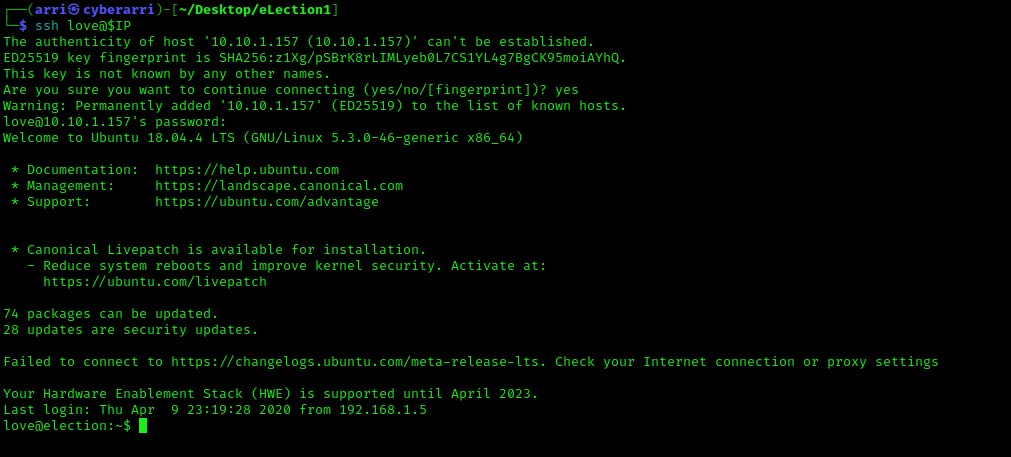
Remembering that port 22 (ssh) was open, I decided to attempt a login to the system as love and using the password I had just gotten, and it worked!
From here, I listed the contents and went to the Desktop of love and then listed what was in the directory using ls -lsa. I noticed a file named “user.txt”, which I then read using cat user.txt.

After checking several post-enumeration steps, I noticed decided to check for SUIDs using the command find / -perm -u=s -type f 2>/dev/null and noticed that an odd SUID came up (“/usr/local/Serv-U/Serv-U”).

I looked this up on GTFO bins. I then proceeded to look at searchsploit using searchsploit serv-u local. This brought up “Serv-U FTP Server < 15.1.7 – Local Privilege Escalation (2)”, which I then copied to my current directory using searchsploit -m multiple/local/47173.sh. I used nano and opened the file using nano 47173.sh and copied all of the text in the file.

From here, I went to a world writable location using cd /var/tmp and then verfied that nano was on the system using which nano.

Now that I knew nano was on the system, I used nano arri-priv-esc.sh and pasted the code in. I saved and exited then added execute permissions on the script with chmod +x arri-priv-esc.sh. I then executed the script using ./arri-priv-esc.sh and then I got that it was a success. I checked who I was using whoami and verified that I had root privileges with id.

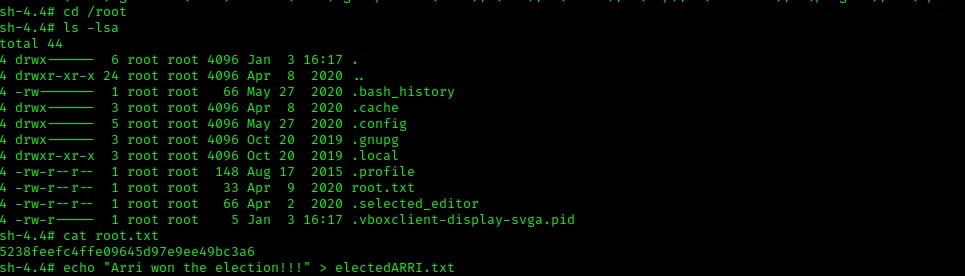
I navigated to the root user’s home directory using cd /root and looked at the contents using ls -lsa. I noticed that there was a file named “root.txt” and I used cat root.txt to get the final flag.
The box is now complete!




 CyberArri
Leave a comment