
I started this machine in OffSec’s Proving Ground’s Play platform. This platform is free to sign up for and gives three hours each day to complete a vulnerable machine. With a subscription to PG from my PEN-200 learning course, I plan to complete a lot of Play and Practice boxes to prepare for my upcoming certification.
From Proving Grounds, I was given the IP address of “192.168.199.130”, so the first thing I did was export a IP variable to use for the future. Once I exported the variable, I started an nmap scan to see what open ports were on the machine. The scan I used was “sudo nmap -sV -sC -Pn -p- $IP --open” (“-sC” – simple scripts, “-sV” – service version, “-Pn” – skip host discovery, “-p-” – all ports, and “--open” – only the open ports are shown). Below is the NMAP results in the notes that I took as I went along.

Seeing as only 2 ports were returned (ftp & ssh), one of which I had no credentials for (ssh). Given that ftp was allowed anonymous login, I decided to connect to it with ftp -A $IP -p 21, which connects to ftp to the target IP on port 21 in active mode (“-A”). When the credentials are asked for, I simply used anonymous as the username and anonymous as the password. This allowed me to then try listing the directory with dir, which resulted in nothing being returned. To ensure that I missed nothing, I used dir -a to view hidden files, which revealed that there was a “.hannah” directory.

I navigated to be in this directory (cd .hannah) and again listed the contents. This revealed that there was a id_rsa key, which I proceeded to download using get id_rsa. I exited out of ftp to explore this file more and see if it could be useful.

After looking at the file, it seemed that it was a id_rsa, so I gave it the proper permissions using chmod 600 id_rsa. I then tried to ssh in as hannah by specifying the odd ssh port along with the id_rsa key that I had just gained (ssh hannah@$IP -p 61000 -i id_rsa). This allowed me to log into the machine!

My first step was to get the local.txt flag, so to find it I used the command find / "local.txt" 2>/dev/null | grep "local.txt", which looks for “local.txt” starting at root, sends all errors (STDERR or code 2) to /dev/null (basically the a black hole), and greps to ensure that only the entries that match “local.txt” exactly show up in the output. This found that the local.txt file was in the current directory (“/home/hannah/local.txt”).

My next step was to escalate privileges. I first tried using sudo -l, but it noted that sudo was not on the machine. I then checked the permissions on /etc/passwd and /etc/shadow (ls -lsa /etc/passwd and ls -lsa /etc/shadow), but there was nothing out of the ordinary. I proceeded to check for other users in /etc/passwd (cat /etc/passwd), but I did not see anyone else other than hannah (service accounts are assigned UIDs under 1000, while normal users have a UID of 1000 or above.).

I checked SUIDs next using find / -perm -u=s -type f 2>/dev/null and noticed that there were a few strange SUIDs mentioned, one of them being “/usr/bin/mawk”.

I looked up mawk on GTFObins and found that it was exploitable. The screenshot below is from that website.
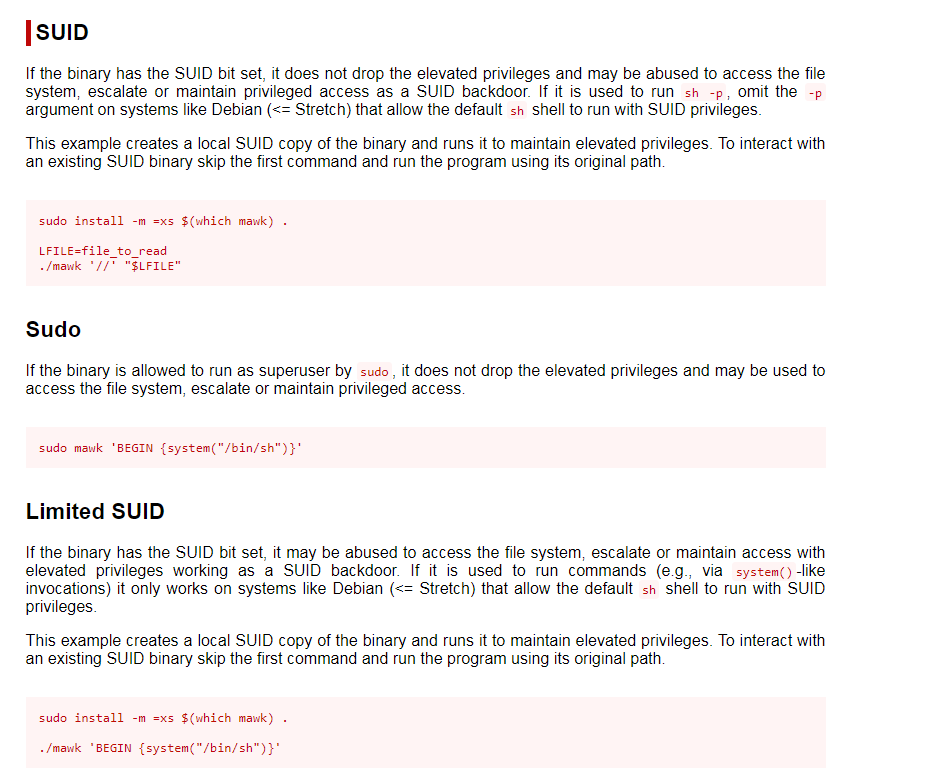
With what I read about the limited SUID and seeing that it could spawn a shell, I decided to try that command first to see if I could gain a shell as root. I had no interest in reading a file like the original SUID mentioned. This did not work, so I continued looking at the list of SUIDs to see if there was anything else that stuck out before I would proceed to check SGIDs. Another SUID that seemed strange in the list was cpulimit, which did have an entry for SUID on GTFObins (can be seen below). The entry seemed that it would spawn a shell.

To run this, I used the command /usr/bin/cpulimit -l 100 -f -- /bin/sh -p. This provided me with root access.

Since I was now root, I could get the “proof.txt” flag, which was located at /root.
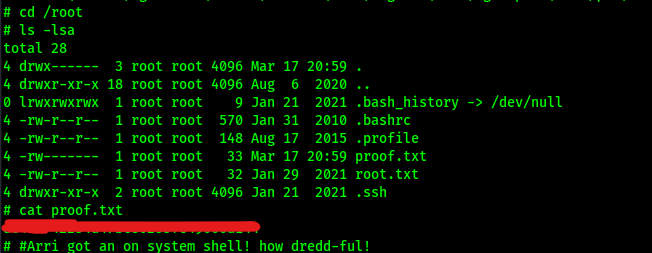
At this point the box is complete!
Main Takeaway Concepts
Check for hidden directories!
Hidden directories are something that should always be looked for. In this example, I would have been completely stumped at the very beginning if I would not have checked for hidden directories. There was nothing but the hidden “.hannah” directory on the ftp server that was on the vulnerable system, which was the only way that I could have found anything to get in.
SUIDs are an important part of exploitation!
There might be SUIDs on a list that might not be familiar, so be sure to always look them up. In this example, I did not recognize “mawk” or “cpulimit”, which led me to look into them to see if they were exploitable. Also, not every SUID exploit is going to be the one you want for the escalation you are looking for, so be sure to understand what the SUID exploit would provide you with. In this case, the SUID for MAWK read any file as root, but my end goal was to become root on the target. This led me to have to check into another SUID to see if that was possible.




 CyberArri
Leave a comment